Data Structures & Algorithms – Search and Sort Algorithm
Welcome back,
This is our fifth and the final module of Data Structures and Algorithms. In our previous module we discussed Tree ADT, Binary Search Tree(BST) implementation, Finding min and max element in a BST, Finding height of BST, BST traversal Breadth first, Depth first, Level order traversal-Preorder, Inorder and PostOrder traversal, Checking whether a Binary tree is BST, Deleting a node from BST concepts.
In this module, we will discuss the following:
5.Algorithms
5.1 Search algorithm:
5.1.1 Linear search
5.1.2 Binary search
5.2Sort algorithm:
5.2.1 Selection sort
5.2.2 Bubble sort
5.2.3 Insertion sort
5.2.4 Merge sort
5.2.5 Quick sort
5.Algorithms
Lets see some search and sort algorithms.
5.1 Search algorithm:
In this module, we discuss
5.1.1 Linear Search Algorithm and
5.1.2 Binary Search Algorithm
5.1.1 Linear search
Runnable Code Snippet_5.1 – Linear Search
/* 5.1.1 linear search  */

#include<iostream>
using namespace std;

int linearSearch(int key,int *arr,int imin,int imax){
    for(int i=imin;i<=imax;i++){
        if(arr[i]==key)
            return i;
            }
        return -1;
}

int main(){
    int*a=NULL;
    int num,key,position;
    cout<<"hw mny elements: ";
    cin>>num;
    a=new int; // if pgm crashes,use=> a=new int [num];
    for(int i=0;i<num;i++){
        cin>>a[i];
    }
    cout<<"Enter element to search: ";
    cin>>key;
    position=linearSearch(key,a,0,num-1);
    if(position==-1)cout<<"not found\n";
    else cout<<key <<" found at "<<"position : "<<position+1<<endl;

    return 0;
}
5.1.2 Binary search
Runnable Code Snippet_5.1.2 – Binary Search
/* 5.1.2 binary search  */
/*Note: dis can be used only for a SORTED ARRAY*/

#include<iostream>
using namespace std;

int binarySearch(int key,int *arr,int imin,int imax){
   int imid;
   while(imin<=imax){
        imid=(imin+imax)/2;
        if(arr[imid]==key)
            return imid;
        else if(key>arr[imid]){
            imin=imid+1;
        }
        else{
            imax=imid-1;
        }
    }
    return -1;
}

int main()
{
    int num,key,loc;
    cout<<"hw mny elements: ";
    cin>>num;
    int *a=new int[num];
    for(int i=0;i<num;i++){
        cin>>a[i];
    }
    cout<<"Enter element to search: ";
    cin>>key;
    loc=binarySearch(key,a,0,num-1);

    if(loc==-1)
        cout<<"not found\n";
    else cout<<key<<" found at position: "<<loc+1<<endl;

    return 0;
}
5.2Sort algorithm:
Lets discuss few Sort algorithms now. Their basic concept is
SelectionSort- find min and swap recursively
BubbleSort- compare with adjacent element and swap, if greater(bubbles largest number up)
InsertionSort- imaginary hole, compare hole-1 element with hole value, insert if less
MergeSort- find mid, recursive Msort(l,mid) Msort(r,n-mid) and merge(left, right arrays)
QuickSort- partitionIndex, pivot, Partition-swap Partition Index(say,PI) with End, recursive Qsort(start,PI-1) and Qsort(PI+1,End)
5.2.1 Selection sort
To sort using Selection sort method find min and swap recursively
Runnable Code Snippet_5.2.1-a – Selection Sort
/* 5.2.1-a selection sort  */

#include<iostream>
using namespace std;

int smallest(int *arr,int imin,int imax){
    int small=imin;
    for(int i=imin+1;i<=imax;i++){
        if(arr[small]>arr[i]){
            small=i;
        }
    }
    return small;
}

void Swap(int *arr,int index1,int index2){
    int temp;
    temp=arr[index1];
    arr[index1]=arr[index2];
    arr[index2]=temp;
}

void selectionSort(int *arr,int imin,int imax){
    int ismall;
    for(int i=imin;i<=imax;i++){
        ismall=smallest(arr,i,imax);
        if(i!=ismall)
            Swap(arr,i,ismall);
    }
}

int main()
{
    int num;
    cout<<"how many elements: ";
    cin>>num;
    int *arr=new int;
    cout<<"Enter the numbers:\n";
    for(int i=0;i<num;i++){
        cin>>arr[i];
    }
    selectionSort(arr,0,num-1);
    cout<<"Sorted list is: \n";

    for(int i=0;i<num;i++){
        cout<<arr[i]<<" ";
    }
    return 0;
}
Alternate method to do Selection Sort with Time complexity: O(n2)
Runnable Code Snippet_5.2.1-b – Selection Sort with Time complexity O(n2)
/* 5.2.1-b – Selection Sort  */
/* Alternate method with Time complexity: O(n2)  */

#include<iostream>
using namespace std;

void selectionSort(int A[],int n){
    for(int i=0;i<n-1;i++){   //we need to do n-2 passes
        int iMin=i;  //ith position elements from i till n-1 are candidates
        for(int j=i+1;j<n;j++){
            if(A[j]<A[iMin])
                iMin=j;   //update the index of minimum element
        }
        int temp=A[i];
        A[i]=A[iMin];
        A[iMin]=temp;
    }
}

int main()
{
    int num;
    cout<<"How many elements: ";
    cin>>num;
    int *A=new int;  //if pgm crashes, use=> int *A=new int[num];
    cout<<"Enter the numbers: \n";
    for(int i=0;i<num;i++){
        cin>>A[i];
    }
    //int A[]={2,7,4,1,5,3};
    cout<<"Sorted list: ";
    selectionSort(A,num);
    for(int i=0;i<num;i++){
        cout<<A[i]<<" ";
    }
    return 0;
}
5.2.2 Bubble sort
To sort using BubbleSort- compare elements with adjacent element and swap, if greater(bubbles largest number up)
Runnable Code Snippet_5.2.2-a – Bubble Sort
/* 5.2.2-a bubble sort  */

#include <iostream>

using namespace std;

void bubbleSort(int array[], int length)
{
    for(int i = 0; i < length - 1; i ++)
    {
        for(int j = length - 1; j > i; j--)
        {
            if(array[j-1] > array[j])
            {
                // Swap elements if the lower-indexed key's value is greater
                // than its higher-indexed neighbor
                array[j] = array[j-1] + array[j];
                array[j-1] = array[j] - array[j-1];
                array[j] = array[j] - array[j-1];
            }
        }
    }
}

int main()
{
    int array[] = {11, 23, 34, 24, 3, 45, 112, 44, 73, 89};
    int length = sizeof(array) / sizeof(int);
    bubbleSort(array, length);
    for(int i = 0; i < length; i++)
    {
        cout<<"The "<<i + 1<<"th element is: "<<array[i]<<endl;
    }
}
/* 5.2.4-b - Merge sort( Alternate method) */

#include<iostream>
using namespace std;

void Merge(int a[], int l[], int lc, int r[], int rc)
{
    int i=0, j=0, k=0;
    while(i<lc&&j<rc)
    {
        if(l[i]<r[j])
        {
            a[k]=l[i];
            k++;
            i++;
        }
        else
        {
            a[k]=r[j];
            k++;
            j++;
        }
    }
    while(i<lc)
    {
        a[k++]=l[i++];
    }
    while(j<rc)
    {
        a[k++]=r[j++];
    }
}


void MergeSort(int a[], int n)
{
    int mid, l[10], r[10];
    if(n<2)
    return;

    mid=n/2;
    for(int i=0; i<mid; i++)
    {
        l[i]=a[i];
    }
    for(int i=mid; i<n; i++)
    {
        r[i-mid]=a[i];
    }

    MergeSort(l,mid);
    MergeSort(r,n-mid);
    Merge(a,l,mid,r,n-mid);
}


int main()
{
    int num;
    cout<<"How many elements: ";
    cin>>num;
    int *A=new int;
    cout<<"Enter the numbers: \n";
    for(int i=0;i<num;i++){
        cin>>A[i];
    }
    cout<<"Sorted list: ";

    MergeSort(A,num);
    for(int i=0;i<num;i++){
        cout<<A[i]<<" ";
    }
    return 0;
}
5.2.5 Quick sort
To sort using QuickSort method -create partitionIndex, find pivot, Partition-swap PI with End, recursive Qsort(start,PI-1) and Qsort(PI+1,End)
Runnable Code Snippet_5.2.5 – Quick Sort
/* 5.2.5 Quick sort  */

#include <iostream>
using namespace std;
int Partition(int *A,int Start,int End){
    int pivot=A[End];
    int partitionIndex=Start;  //set partition index as start initially
    for(int i=Start;i<End;i++){
        if(A[i]<pivot){
            swap(A[i],A[partitionIndex]);
            partitionIndex++;
        }
    }
    swap(A[partitionIndex],A[End]);
    return partitionIndex;
}

void QuickSort(int *A,int Start,int End){
    if(Start<End){
        int partitionIndex=Partition(A,Start,End);
        QuickSort(A,Start,partitionIndex-1);
        QuickSort(A,partitionIndex+1,End);
    }
}

int main()
{
    int num;
    cout<<"How many elements: ";
    cin>>num;
    int *A=new int[num];
    cout<<"Enter the numbers: \n";
    for(int i=0;i<num;i++){
        cin>>A[i];
    }
    cout<<"Sorted list: ";

    QuickSort(A,0,num-1);   //ATTENTION : num-1
    for(int i=0;i<num;i++){
        cout<<A[i]<<" ";
    }
    return 0;
}
So, we have come to the end of this read- Data Structures and Algorithms.
We discussed Linked List, Stack, Queue and Tree. Under the Linked List module, we discussed insertion of node at the beginning of Linked List, insertion of node at n-th position of Linked List, insertion of node at end of Linked List, deletion of node at n-th position of Linked List, Linked List reversal- iteratively and recursively, printing element of Linked List forward and reverse, Doubly Linked List,and a dedicated page for Circular Linked List. Under the Stack module, we discussed array implementation of Stack, Linked List implementation of Stack, reversing a string or Linked List using stack STL, balanced paranthesis check using Stack, Evaluating prefix & postfix expression using Stack and Infix to postfix using Stack. Under Queue module we discussed array implementation of Queue and Linked List implementation of Queue. Under Tree module we discussed Tree properties, Types of Trees, Binary Search tree(BST) implementation, finding min and max element in a BST, finding height of BST, BST traversal- Breadth first, Depth first, level order traversal, preorder, inorder, postorder traversals, Checking Binary tree for BST and deleting node from BST.
In addition to that we discussed, few Search and Sort Algorithms. Under Search Algorithm we discussed Linear search and Binary search Algorithms. Under Sort algorithm we covered Selection sort, Bubble sort, Insertion sort, Merge sort and Quick sort.
If you feel I missed any topic, please let me know. I will try to cover them as well, hopefully.
Corrections and Improvement Suggestions are highly appreciated. Thanks in advance..
Please follow the blog to stay updated with the upcoming modules.
This is our fourth module of Data Structures and Algorithms. In our previous module we discussed Queue ADT, Queue Operations and Applications, Array implementation of Queue, Circular Array implementation of Queue, Linked list implementation of Queue concepts.
In this module, we will discuss the following:
4. Tree ADT:
4.1 Binary Search Tree(BST) implementation
4.2 Finding min and max element in a BST
4.3 Find height of BST
4.4 BST traversal breadth first,depth first
4.5 Level order traversal
4.6 Preorder, Inorder and PostOrder traversal
4.7 Checking whether a Binary tree is BST
4.8 Deleting a node from BST
4. Tree ADT:
Tree :
It is a Non-linear hierarchial (and recursive) data structure. Whereas LINEAR DATA STRUCTURES consists of prev, next elements, they have their data in a sequential manner with a LOGICAL START and END. Linear data structures are Array, L.L, Stack, Queue.
Tree is a recursive data structure. Since Tree is divided into subtrees, they also follow the hierarchical arrangement. Tree is used to store data which are naturally hierarchical, say files and folders in disk drive.
Tree Definition :
Tree is a collection of entity called “NODE”,linked together to simulate a hierarchy. Node contains data of any type .,i.e object. The hierarchical link gives parent/children relationship.
Tree Vocabulary:
Root
Children/Child
Parent
Sibling
Leaf- A node with no child (rest of the nodes are internal nodes)
Ancestor / Descendant
Tree Properties:
Recursive data structure
For a tree with N nodes, there will be (N-1) edges.
Depth / Height
Depth of x = length of path from root to x (Or)
Depth of x = No. of edges in path from root to x
Remember, Depth of root = 0 (food for thought..!!)
Height of x = No. Of edges in LONGEST PATH from x to a leaf
Remember,
Height of leaf node = 0
Height of root node = Height of the tree
Max depth of b/n tree = Height of b/n tree
Applications of Tree :
Storing naturally hierarchical data
eg: file system in disk drive, files/folders in disk
Organizing data for quick search, insertion, deletion
eg: Binary Search Tree. BST is the efficient way to store ordered data, with a time complexity of log2 n.
Network Routing Algorithm.
Special tree called TRIE is used to store dictionary for dynamic spell checking.
Binary Tree :
A tree in which each Node can have atmost 2 children.
Syntax:
struct Node{
		int data;
		Node* left;  //pointer to left child
		Node* right;  //pointer to right child
	};
	Node* root;  //pointer to root node
Diff. ways of representing Binary Tree :
A Node itself is a B/n tree
eg: A single Node alone is a B/n tree
A tree with only left or right chidren is a B/n tree
A tree with both right and left children, but the subtrees have either right or left children. Since a Node cannot have more than 2 children, but less than 2, say 0 or 1 is accepted
Property of Binary Tree :
Max no. Of Nodes in a level = 2i , where i -is level
Max no. Of Nodes in a B/n tree = 2h+1 -1, where h -is height
i.e., 20 +21 +……2h = 2(no. Of levels)-1
Types of Binary Tree :
Strict / Proper Binary tree
Complete Binary tree
Perfect Binary tree
Balanced Binary tree
Binary search tree
1.Strict / Proper Binary Tree :
Each Node can have either 2 or 0 children. (One child is NOT ALLOWED)
2. Complete Binary Tree :
All levels except possibly the last are completely filled and all Nodes are as left as possible. (last but one level should be completely filled)
Height of complete B/n tree ( h) = log2 n, where n – is number of Nodes.
3. Perfect Binary Tree :
All levels must be completely filled.
Max no. Of Nodes in a B/n tree = 2h+1 -1, where h -is height
Height of perfect B/n tree : h= log2 (n+1)-1, where n – is no. Of Nodes.
Note: Perfect B/n tree is also a Complete b/n tree
4. Balanced Binary Tree :
Diff between the height of left and right subtree for every Node is not more than k (mostly 1)
5. Binary Search Tree (BST) :
A Binary tree, in which for each Node, value of all the Nodes in left subtree is lesser (or equal) and value of all the Nodes in right subtree is greater.
Note:
Time complexity is directly proportional to Height of BST, so keep the height less, but denser
Inorder traversal of BST gives sorted list
4.1 Binary Search Tree (BST) implementation
Runnable Code Snippet_4.1 – Binary Search Tree (BST) implementation
/* 4.1 BST implementation  */

#include<iostream>
using namespace std;

struct Node{
    int data;
    Node* left;
    Node* right;
};


Node* GetNewNode(int x){
    Node* temp=new Node;
    temp->data=x;
    temp->left=NULL;
    temp->right=NULL;
    return temp;
}

Node* Insert(Node* root,int x){
    if(root==NULL){
        root=GetNewNode(x);
    }
    else if(x<root->data){
        root->left=Insert(root->left,x);
    }
    else{
        root->right=Insert(root->right,x);
    }

    return root;
}

bool Search(Node* root,int x){
    if(root==NULL) return false;
    if(root->data==x) return true;
    else if(x<=root->data)
        return Search(root->left,x);
    else return Search(root->right,x);

}

int main()
{
    Node * root= NULL;  //keeping root as local variable
    int range,x;
    cout<<"how many elements :";
    cin>>range;
    for(int i=0;i<range;i++){
        cout<<"enter element: ";
        cin>>x;
        root=Insert(root,x);
    }

    int num;
    cout<<"Enter number to search: ";
    cin>>num;
    if(Search(root,num)==true)
        cout<<num<<" found"<<endl;
    else cout<<num<<" Not found"<<endl;
    return 0;
}
4.2 Finding min and max element in a BST
Runnable Code Snippet_4.2-a – Finding min element in a BST
/* 4.2-a find min element in a BST   */

/*To find min*/
#include<iostream>
using namespace std;

struct Node{
    int data;
    Node* left;
    Node* right;
};

Node* GetNewNode(int x){
    Node* temp=new Node;
    temp->data=x;
    temp->left=NULL;
    temp->right=NULL;
    return temp;
}

Node* Insert(Node* root,int x){
    if(root==NULL){
        root=GetNewNode(x);
    }
    else if(x<root->data){
        root->left=Insert(root->left,x);
    }
    else{
        root->right=Insert(root->right,x);
    }
    return root;
}


//ftn to find minimum of BST
int FindMin(Node* root){
    if(root==NULL){
        cout<<"Empty"<<endl;
        return -1;
    }
    else if(root->left==NULL){
        return root->data;
    }
    else
        return FindMin(root->left); //recursively
}

int main()
{
    Node * root= NULL;  //keeping root as local variable
    int range,x;
    cout<<"how many elements :";
    cin>>range;
    for(int i=0;i<range;i++){
        cout<<"enter element: ";
        cin>>x;
        root=Insert(root,x);
    }

    int minVal=FindMin(root);
    cout<<"Minimum value is : "<<minVal<<endl;

    return 0;
}
Runnable Code Snippet_4.2-b – Finding max element in a BST
/*4.2-b - Finding max element in a BST */

/*To find max*/

#include<iostream>
using namespace std;

struct Node{
    int data;
    Node* left;
    Node* right;
};


Node* GetNewNode(int x){
    Node* temp=new Node;
    temp->data=x;
    temp->left=NULL;
    temp->right=NULL;
    return temp;
}

Node* Insert(Node* root,int x){
    if(root==NULL){
        root=GetNewNode(x);
    }
    else if(x<root->data){
        root->left=Insert(root->left,x);
    }
    else{
        root->right=Insert(root->right,x);
    }
    return root;
}


//ftn to find maximum of BST
int FindMax(Node* root){
    if(root==NULL){
        cout<<"Empty"<<endl;
        return -1;
    }
    else if(root->right==NULL){
        return root->data;
    }
    else
        return FindMax(root->right); //recursively
}

int main()
{
    Node * root= NULL;  //keeping root as local variable
    int range,x;
    cout<<"how many elements :";
    cin>>range;
    for(int i=0;i<range;i++){
        cout<<"enter element: ";
        cin>>x;
        root=Insert(root,x);
    }

    int maxVal=FindMax(root);
    cout<<"Maximum value is : "<<maxVal<<endl;

    return 0;
}
4.3 Finding Height of BST
Runnable Code Snippet_4.3 – Finding Height of BST
/*  4.3 find height of Binary Tree   */
#include<iostream>
using namespace std;

struct Node{
    int data;
    Node* left;
    Node* right;
};


Node* GetNewNode(int x){
    Node* temp=new Node;
    temp->data=x;
    temp->left=NULL;
    temp->right=NULL;
    return temp;
}

Node* Insert(Node* root,int x){
    if(root==NULL){
        root=GetNewNode(x);
    }
    else if(x<root->data){
        root->left=Insert(root->left,x);
    }
    else{
        root->right=Insert(root->right,x);
    }
    return root;
}

int FindHeight(Node* root){
    if(root==NULL)
        return -1;
    return max(FindHeight(root->left),FindHeight(root->right))+1;
}

int main()
{
    Node * root= NULL;  //keeping root as local variable
    int range,x;
    cout<<"how many elements :";
    cin>>range;
    for(int i=0;i<range;i++){
        cout<<"enter element: ";
        cin>>x;
        root=Insert(root,x);
    }
    int height=FindHeight(root);
    cout<<"Height is: "<<height<<endl;

     return 0;
}
4.4 BST traversal – Breadth first, Depth first
Binary Tree Traversal:
Breadth first a.k.a. Level-Order (we implement Queue(FIFO) to traverse)
Depth first
Pre-Order (DLR) ( root- left – right )
In-Order (LDR) (left- root- right)
Post-Order (LRD) (left- right- data)
4.5 Level order traversal (a.k.a Breadth First)
Runnable Code Snippet_4.5– BST traversal – Breadth first – Level Order
/* 4.5 Breadth first  -Level Order*/

#include<iostream>
#include<queue>
using namespace std;

struct Node{
    int data;
    Node* left;
    Node* right;
};


Node* GetNewNode(int x){
    Node* temp=new Node;
    temp->data=x;
    temp->left=NULL;
    temp->right=NULL;
    return temp;
}

Node* Insert(Node* root,int x){
    if(root==NULL){
        root=GetNewNode(x);
    }
    else if(x<root->data){
        root->left=Insert(root->left,x);
    }
    else{
        root->right=Insert(root->right,x);
    }
    return root;
}

//LevelOrder ftn using Queue stl
void LevelOrder(Node* root){
    if(root==NULL) return;
    queue<Node*>Q; //from STL
    Q.push(root);
    //while atleast one discovered node
    while(!Q.empty()){
        Node* current=Q.front();
        cout<<current->data<<" ";
        if(current->left!=NULL) Q.push(current->left);
        if(current->right!=NULL)Q.push(current->right);
        Q.pop(); //removing element at front
    }
}


int main()
{
    Node * root= NULL;  //keeping root as local variable
    int range,x;
    cout<<"how many elements :";
    cin>>range;
    for(int i=0;i<range;i++){
        cout<<"enter element: ";
        cin>>x;
        root=Insert(root,x);
    }

    LevelOrder(root);

    return 0;
}
Runnable Code Snippet_4.7 – Check Binary tree is BST
/* 4.7 - Check given Binary tree is BST */

#include<iostream>
using namespace std;

struct Node
{
    int data;
    Node* left;
    Node* right;
};

Node* GetNewNode(int x){
    Node* temp=new Node;
    temp->data=x;
    temp->left=NULL;
    temp->right=NULL;
    return temp;
}

Node* Insert(Node* root,int x){
    if(root==NULL){
        root=GetNewNode(x);
    }
    else if(x<root->data){
        root->left=Insert(root->left,x);
    }
    else{
        root->right=Insert(root->right,x);
    }
    return root;
}

// Returns true if given tree is BST.
bool isBST(Node* root, Node* l=NULL, Node* r=NULL)
{
    // Base condition
    if (root == NULL)
        return true;

    // if left node exist then check it has
    // correct data or not
    if (l != NULL && root->data < l->data)
        return false;

    // if right node exist then check it has
    // correct data or not
    if (r != NULL && root->data > r->data)
        return false;

    // check recursively for every node.
    return isBST(root->left, l, root) &&
           isBST(root->right, root, r);
}


/* Driver program to test above functions*/
int main()
{
	Node * root= NULL;
    int range,x;
    cout<<"how many elements :";
    cin>>range;
    for(int i=0;i<range;i++){
        cout<<"enter element: ";
        cin>>x;
        root=Insert(root,x);
    }

    if (isBST(root))
        cout << " Above binary tree is a BST...\n";
    else
        cout << "Above binary tree is not a BST..!\n";

    return 0;
}
4.8 Deleting a node from BST
Runnable Code Snippet_4.8 – Delete a node from BST
We covered Tree ADT, Binary Search Tree(BST) implementation, Finding min and max element in a BST, Finding height of BST, BST traversal Breadth first, Depth first, Level order traversal-Preorder, Inorder and PostOrder traversal, Checking whether a Binary tree is BST, Deleting a node from BST concepts. In our next module we will discuss Search and Sort Algorithms.
Please follow the blog to stay updated with the upcoming modules.
love,
<R.S>
For Complete Sourcecode visit myGithub repo: Link provided in the final module
This is our third module of Data Structures and Algorithms. In our previous module we discussed Stack ADT, Array implementation of stack, Linked List implementation of stack, Reversing a string or Linked List using stack, Infix, Postfix, Prefix – Evaluate Postfix expression, Infix to Postfix, Infix to Postfix with Paranthesis.
In this module, we will discuss the following:
3. Queue
3.1 Array implementation of Queue
3.2 Circular Array implementation of Queue
3.3 Linked list implementation of Queue
3. QUEUE ADT:
A list of collection with the restriction that insertion can be performed at one end(REAR/ tail) and deletion can be performed at other end(FRONT / head).
QUEUE OPERATION:
Time complexity: O(1) or Constant time
Enqueue(x) Or Push(x)
adds element to the tail/ rear
syntax: void Enqueue(int x)
Dequeue( ) Or Pop( )
removes front element and may return the element
syntax: int Dequeue()
front( ) Or Peek( )
returns the front element, doesn’t remove it
Isempty( )
may be boolean
QUEUE APPLICATION:
Handle request for Shared resouces
Printer Queue
Process Scheduling
Simulating wait
3.1 Array implementation of Queue
Pseudocode for Array implementation of Queue
/* pseudocode- Array implementation of Queue */
int A[10]  //create an array
front <- -1 //empty array points NULL
rear <- -1   //empty array

IsEmpty(){
    if((front==-1) && (rear==-1))
        return true
    else return false
}

IsFull(){
    if(rear == (sizeof(A)-1))
        print "Queue is full"
        return
}


Enqueue(x){
    if(IsFull())
        return
    elseif IsEmpty(){
        front <- rear <- 0  //points to first element
    }
    else{
        rear <- rear+1
    }
    A[rear] <- x
}

Dequeue(){
    if(IsEmpty())
        return
    elseif(front == rear){
        front <- rear <- -1
    }
    else{
        front <- front+1
    }
}
3.2 Circular Array implementation of Queue
Pseudocode for Circular Array implementation of Queue
/*Pseudocode -Circular Array implementation of Queue*/
 current position=i
    next position = (i+1) % N
    prev position = (i+N-1) % N   */

    int A[5]

    //Enqueue ftn
    Enqueue(x){
        if(rear+1)%N == front //Q is full
            return
        elseif IsEmpty(){
            front <- rear <- 0 //point to first element
        }
        else{
            rear <- (rear+1) % N //point to next position
        }
        A[rear] <- x
    }

    //Dequeue ftn
    Dequeue(){
        if(IsEmpty())
            return
        elseif(front == rear){ //since only one element
            front <- rear <- -1 //make them point NULL
        }
        else{
            front <- (front+1)%N /*from front one element is deleted, so pint to next element*/
        }
    }

    //Front ftn
    front(){
        return A[front]
    }
3.3 Linked list implementation of Queue
Runnable SourceCode_3.3-Linked list implementation of Queue
/*Queue - Linked List implementation*/

#include<iostream>
using namespace std;

struct Node{
    int data;
    Node* next;
};

Node* frnt=NULL;
Node* rear=NULL;

//Enqueue ftn
void Enqueue(int x){
    Node* temp=new Node;
    temp->data=x;
    temp->next=NULL;
    if(frnt==NULL && rear==NULL){ //if empty
        frnt=rear=temp;  /*making the node as first element*/
    }
    else{
        rear->next=temp; //since in Q, we add in end
        rear=temp;
    }
}

//Dequeue ftn
void Dequeue(){
    Node* temp=frnt; //since in Q, we delete from front
    if(frnt==NULL) return; //empty list
    if(frnt==rear){ //only one element
        frnt=rear=NULL; //make it empty
    }
    else{
        frnt=frnt->next;
        delete temp; //important..!!!dealloc temp
    }
}

void Print(){
    Node* temp=frnt;
    while(temp!=NULL){
        cout<<temp->data<<" ";
        temp=temp->next;
    }
    cout<<endl;
}

int main()
{
    Enqueue(1);
    Enqueue(2);
    Enqueue(3);
    Print(); // 1 2 3
    Dequeue();
    Print(); //2 3
    return 0;
}
We covered Queue ADT, Queue Operations and Applications, Array implementation of Queue, Circular Array implementation of Queue, Linked list implementation of Queue concepts. In our next module we will discuss about Tree ADT.
Please follow the blog to stay updated with the upcoming modules.
love,
<R.S>
For Complete Sourcecode visit myGithub repo: Link provided in the final module
This is our second module of Data Structures and Algorithms. In our previous module we walked through Linked Lists – Insertion, Deletion, Reversal, Printing elements of Linked List, Doubly Linked List and Circular Linked List Traversal, Insertion, Sorted Insertion, checking a Linked List Circular.
In this module, we will discuss about the following:
A list with the restriction that insertion(Push operation) and deletion(Pop operation) can be performed only from one end, called top.
Stack Operations:
Push(x)
Pop(x)
Top(x)
IsEmpty(x)
Time complexity of all these operations :Constant time or O(1), read as Big O of 1. Note: for better understanding of this Big -O-Notation, refer our previous modules for the link.
2.1 Array implementation of stack
Runnable Code Snippet_2.1 Array implementation of stack
/* array implementation of stack*/
// Stack - Object oriented implementation using arrays

#include<iostream>
using namespace std;

#define MAX_SIZE 101

class Stack{
private:
    int A[MAX_SIZE];  //array to store the stack
    int top;  //variale to mark the top index of stack
public:
    Stack(){  //constructor
        top=-1;  //for empty stack,set top=-1
    }

    //Push operation to insert an element on top of stack
    void Push(int x){
        if(top==MAX_SIZE-1){  //overflow case
            cout<<"Error: stack overflow"<<endl;
            return;
        }
        A[++top]=x; //pre-increment top
    }

    //Pop operation to remove an element from top of stack
    void Pop(){
        if(top==-1){  //throw error, if stack empty
            cout<<"Error: Stack is empty"<<endl;
            return;
        }
        top--;
    }

    //Top operation to return element at top of stack
    int Top(){
        return A[top];
    }


    //this ftn returns 1(true),if stack is empty,0(false) otherwise
    bool IsEmpty(){
        if(top==-1)return 1;
        return 0;
    }

    //only for testing-not a valid operation of stack
    void Print(){
        cout<<"Stack: ";
        for(int i=0;i<=top;i++)
            cout<<A[i]<<" ";
            cout<<endl;
    }
};

int main()
{ /*Driver code to test the implementation*/
    Stack S;
    S.Push(2);
    S.Push(4);
    S.Push(6);
    S.Print();//2 4 6
    S.Pop();
    S.Print();  //2 4
    S.Push(8);
    S.Print();  //2 4 8
    return 0;
}
2.2 Linked List implementation of stack :
In array we have the list of fixed size of contiguous memory, but here in linked list it is dynamic non-contiguous memory.
In a Stack of Linked list, Insert/delete operation can be done from two ends, either at end or at beginning. But Insert/delete at end takes time complexity : O(n), which is not acceptable by stack ADT so we go with Insert/delete at beginning: O(1)
Runnable Code Snippet_2.2 Linked List implementation of stack :
/* 2.2 Linked List implementation of stack */


#include<iostream>
using namespace std;

class Stack{
private:
    int data;
    Stack *link,*top;
public:
    Stack(){
        top=NULL;
    }

    void Push(int x){
        Stack* temp=new Stack;
        temp->data=x;
        temp->link=NULL;
        if(top==NULL){
            top=temp;
            return;
        }
        Stack* temp1=top;
        temp->link=temp1;
        top=temp;
    }

    void Pop(){
        Stack* temp=top;
        if(temp==NULL) {
            cout<<"Error: Stack Empty"<<endl;
            return;
        }
        top=temp->link;
        delete temp; //dealloc memory from heap
    }

    int Top(){
        Stack* temp=top;
        cout<<temp->data<<endl;
        return top->data; //return temp
    }

    int IsEmpty(){
        if(top==NULL) return 1;
        else return 0;
    }

    //only for test purpose- NOT A VALID OPERATION OF STACK
    void Print(){
        Stack* temp=top;
        while(temp!=NULL){
            cout<<temp->data<<" ";
            temp=temp->link;
        }
        cout<<endl;
    }

};

int main()
{
    Stack S;
    S.Push(3);
    S.Push(2);
    S.Push(1);
    S.Print(); //1 2 3
    S.Pop();
    S.Print(); //2 3
    S.Push(4);
    S.Print(); //4 2 3
    return 0;
}
2.3 Reversing a string or Linked List using stack
Warrior shouldn’t just possess a weapon,
He must know when and how to use it …!!!
—
using stack to Reverse a string usingSTL – Standard Template Library
Time complexity: O(n)
Space complexity: O(n)
NOTE: To make space complexity : O(1) , we can use two pointers i, j as follows
i->start, j->end;
while(i<j) swap elements of i and j ;
i++, j–;
check condition and swap until reaches n/2
Runnable Code Snippet_2.3-a Reversing a string using stack STL
/*  2.3-a Reversing a String using stack STL  */

#include<iostream>
#include<string.h>
#include<stack>   //stack from STL
using namespace std;

void Reverse(char *C,int n)     /*   char*C same as char C[],since arrays are passed by ref thru pointer*/
{
    stack<char> S; /*syntax:   stack<datatype> name or identifier*/

    //loop for push
    for(int i=0;i<n;i++){
        S.push(C[i]);
    }

    //loop for pop
    for(int i=0;i<n;i++){
        C[i]=S.top(); //overwrite the char at index i
        S.pop(); //perform pop
    }
}

int main()
{
    char C[50];
    cout<<"Enter a string: ";
    cin.getline(C,50);
    Reverse(C,strlen(C));
    cout<<"Output: "<<C;
    return 0;
}
Runnable Code Snippet_2.3-b Reversing a Linked List using stack STL
/*pseudocode to evaluate Postfix expression:*/

EvaluatePostfix(exp){
	create a stack S
	for i<-0 to length(exp)-1
		{
			if(exp[i] is operand)
                                         push(exp[i])
			else if(exp[i] is operator)
			{
				op2<-pop()
				op1<-pop()
				res<-perform(exp[i],op1,op2)
				push(res)
			} //end of else if
		} //end of for loop
return top of stack
}
2.5 Infix to Postfix
Pseudocode for Infix to Postfix
/* Pseudocode for Infix to Postfix */

InfixToPostfix(exp){
   create a stack S
   res<- empty string
   for(i<- 0 to length(exp)-1){
	if(exp[i] is operand){
		res<- res + exp[i]
	}
	else if(exp[i] is operator ){
		while(!s.empty() && HasHigherPreced(S.top(),exp[i]) ){
			res<- res + S.top()
			S.pop()
		}	// end of while
	S.push(exp[i])
	}//end of else if
}//end of for loop

while(!S.empty()){
	res<-res+S.top()
	S.pop()
} //end of while
return res
}//EOF
2.6 Infix to Postfix with Paranthesis
/* Infix to Postfix with Paranthesis */

InfixToPostfix(exp){
   create a stack S
   res<- empty string
   for(i<- 0 to length(exp)-1){
	if(exp[i] is operand){
		res<- res + exp[i]
	}
	else if(exp[i] is operator ){
		while(!S.empty() && HasHigherPreced(S.top(),exp[i]) && !IsOpenParanth(S.top()) ){
			res<- res + S.top()
			S.pop()
		}	// end of while
	S.push(exp[i])
	}//end of else if
else if(IsOpenParanth(exp[i])){    /* elseif(exp[i]==’(’)    */
	S.push(exp[i])
}//end of elseif
elseif(IsClosingParanth(exp[i])){   /*elseif(exp[i]==’)’)   */
	while(!S.empty() && IsOpen)
}//end of elseif
}//end of for loop

while(!S.empty()   &&  !IsOpenParanth(S.top())){
	res<-res+S.top()
	S.pop()
} //end of while
S.pop()
}//end of elseif

while(! S.empty()){
	res<-res+ S.top()
	S.pop()
} //end of while
return res
}//EOF
So far we covered Array and Linked List implementations of stack, string and Linked List Reversal using Stack STL, Infix, Postfix and Prefix concepts. In our next module we will discuss about Queue ADT.
Please follow the blog to stay updated with the upcoming modules.
love,
<R.S>
For Complete Sourcecode visit myGithub repo: Link provided in the final module
1.9.1 Circular Linked List- Introduction and Applications
Circular linked list is a linked list where all nodes are connected to form a circle. There is no NULL at the end. A circular linked list can be a singly circular linked list or doubly circular linked list.
Fig: Circular Linked List
Applications of Circular Linked Lists: 1) Any node can be a starting point. We can traverse the whole list by starting from any point. We just need to stop when the first visited node is visited again.
2) Useful for implementation of queue. We don’t need to maintain two pointers for front and rear if we use circular linked list. We can maintain a pointer to the last inserted node and front can always be obtained as next of last.
3) Circular lists are useful in applications to repeatedly go around the list. For example, when multiple applications are running on a PC, it is common for the operating system to put the running applications on a list and then to cycle through them, giving each of them a slice of time to execute, and then making them wait while the CPU is given to another application. It is convenient for the operating system to use a circular list so that when it reaches the end of the list it can cycle around to the front of the list.
4) Circular Doubly Linked Lists are used for implementation of advanced data structures like Fibonacci Heap.
Runnable Code Snippet_1.9.1 – Circular Linked List
In a conventional linked list, we traverse the list from the head node and stop the traversal when we reach NULL. In a circular linked list, we stop traversal when we reach the first node again. Following is C code for linked list traversal.
/* Function to traverse a given Circular linked list and print nodes */
void printList(struct Node *first)
{
    struct Node *temp = first;

    // If linked list is not empty
    if (first != NULL)
    {
        // Keep printing nodes till we reach the first node again
        do
        {
            printf("%d ", temp->data);
            temp = temp->next;
        }
        while (temp != first);
    }
}
Demonstrating Traversal:
Following program demonstrates the traversal of circular linked list.
Runnable Code Snippet_1.9.2 – Circular Linked List – Traversal
/*Circular Linked List - Traversal*/

#include<stdio.h>
#include<stdlib.h>

/* structure for a node */
struct Node
{
    int data;
    struct Node *next;
};

/* Function to insert a node at the begining of a Circular
   linked list */
void push(struct Node **head_ref, int data)
{
    struct Node *ptr1 = (struct Node *)malloc(sizeof(struct Node));
    struct Node *temp = *head_ref;
    ptr1->data = data;
    ptr1->next = *head_ref;

    /* If linked list is not NULL then set the next of last node */
    if (*head_ref != NULL)
    {
        while (temp->next != *head_ref)
            temp = temp->next;
        temp->next = ptr1;
    }
    else
        ptr1->next = ptr1; /*For the first node */

    *head_ref = ptr1;
}

/* Function to print nodes in a given Circular linked list */
void printList(struct Node *head)
{
    struct Node *temp = head;
    if (head != NULL)
    {
        do
        {
            printf("%d ", temp->data);
            temp = temp->next;
        }
        while (temp != head);
    }
}

/* Driver program to test above functions */
int main()
{
    /* Initialize lists as empty */
    struct Node *head = NULL;

    /* Created linked list will be 11->2->56->12 */
    push(&head, 12);
    push(&head, 56);
    push(&head, 2);
    push(&head, 11);

    printf("Contents of Circular Linked List\n ");
    printList(head);

    return 0;
}
1.9.3 Circular Linked List – Insertion:
Split the given Circular Linked List into two halves, for example
Given Circular Linked List
if the above Circular linked List is given. then split is as below
first half circular
and
second half circular
Follow the below algorithm. 1) Store the mid and last pointers of the circular linked list using tortoise and hare algorithm. 2) Make the second half circular. 3) Make the first half circular. 4) Set head (or start) pointers of the two linked lists.
In the below implementation, if there are odd nodes in the given circular linked list then the first result list has 1 more node than the second result list.
Runnable Code Snippet_1.9.3Circular Linked List – Insertion
/* 1.9.3 Circular Linked List - Insertion */
#include<stdio.h>
#include<stdlib.h>

/* structure for a node */
struct Node
{
  int data;
  struct Node *next;
};
/* Function to split a list (starting with head) into two lists.
   head1_ref and head2_ref are references to head nodes of
    the two resultant linked lists */
void splitList(struct Node *head, struct Node **head1_ref,
                                            struct Node **head2_ref)
{
  struct Node *slow_ptr = head;
  struct Node *fast_ptr = head;

  if(head == NULL)
    return;

  /* If there are odd nodes in the circular list then
     fast_ptr->next becomes head and for even nodes
     fast_ptr->next->next becomes head */
  while(fast_ptr->next != head &&
         fast_ptr->next->next != head)
  {
     fast_ptr = fast_ptr->next->next;
     slow_ptr = slow_ptr->next;
  }

 /* If there are even elements in list then move fast_ptr */
  if(fast_ptr->next->next == head)
    fast_ptr = fast_ptr->next;

  /* Set the head pointer of first half */
  *head1_ref = head;

  /* Set the head pointer of second half */
  if(head->next != head)
    *head2_ref = slow_ptr->next;

  /* Make second half circular */
  fast_ptr->next = slow_ptr->next;

  /* Make first half circular */
  slow_ptr->next = head;
}

/* UTILITY FUNCTIONS */
/* Function to insert a node at the begining of a Circular
   linked lsit */
void push(struct Node **head_ref, int data)
{
  struct Node *ptr1 = (struct Node *)malloc(sizeof(struct Node));
  struct Node *temp = *head_ref;
  ptr1->data = data;
  ptr1->next = *head_ref;

  /* If linked list is not NULL then set the next of
    last node */
  if(*head_ref != NULL)
  {
    while(temp->next != *head_ref)
      temp = temp->next;
    temp->next = ptr1;
  }
  else
     ptr1->next = ptr1; /*For the first node */

  *head_ref = ptr1;
}

/* Function to print nodes in a given Circular linked list */
void printList(struct Node *head)
{
  struct Node *temp = head;
  if(head != NULL)
  {
    printf("\n");
    do {
      printf("%d ", temp->data);
      temp = temp->next;
    } while(temp != head);
  }
}

/* Driver program to test above functions */
int main()
{
  int list_size, i;

  /* Initialize lists as empty */
  struct Node *head = NULL;
  struct Node *head1 = NULL;
  struct Node *head2 = NULL;

  /* Created linked list will be 12->56->2->11 */
  push(&head, 12);
  push(&head, 56);
  push(&head, 2);
  push(&head, 11);

  printf("Original Circular Linked List");
  printList(head);

  /* Split the list */
  splitList(head, &head1, &head2);

  printf("\nFirst Circular Linked List");
  printList(head1);

  printf("\nSecond Circular Linked List");
  printList(head2);

  getchar();
  return 0;
}
1.9.4 –Sorted insertion for circular linked list
After Sorted Insertion of Circular Linked List, the elements must be in sorted order. For example, if we have a Circular Linked List
Given Circular Linked List
After inserting an element 7, the above Circular Linked List should be changed to the following
After Sorted insertion (element 7 is inserted and the nodes are in sorted order)
Algorithm:
Allocate memory for the newly inserted node and put data in the newly allocated node. Let the pointer to the new node be new_node. After memory allocation, following are the three cases that need to be handled.
1) Linked List is empty:
a) since new_node is the only node in CLL, make a self loop.
new_node->next = new_node;
b) change the head pointer to point to new node.
*head_ref = new_node;
2) New node is to be inserted just before the head node:
(a) Find out the last node using a loop.
while(current->next != *head_ref)
current = current->next;
(b) Change the next of last node.
current->next = new_node;
(c) Change next of new node to point to head.
new_node->next = *head_ref;
(d) change the head pointer to point to new node.
*head_ref = new_node;
3) New node is to be inserted somewhere after the head:
(a) Locate the node after which new node is to be inserted.
while ( current->next!= *head_ref &&
current->next->data < new_node->data)
{ current = current->next; }
(b) Make next of new_node as next of the located pointer
new_node->next = current->next;
(c) Change the next of the located pointer
current->next = new_node;
Runnable Code Snippet_1.9.4 – Sorted insertion for circular linked list
/* 1.9.4 - Sorted insertion for circular linked list */

#include<stdio.h>
#include<stdlib.h>

/* structure for a node */
struct Node
{
  int data;
  struct Node *next;
};

/* function to insert a new_node in a list in sorted way.
   Note that this function expects a pointer to head node
   as this can modify the head of the input linked list */
void sortedInsert(struct Node** head_ref, struct Node* new_node)
{
  struct Node* current = *head_ref;

  // Case 1 of the above algo
  if (current == NULL)
  {
     new_node->next = new_node;
     *head_ref = new_node;
  }


  // Case 2 of the above algo
  else if (current->data >= new_node->data)
  {
    /*If value is smaller than head's value then
      we need to change next of last node */
    while(current->next != *head_ref)
        current = current->next;
    current->next = new_node;
    new_node->next = *head_ref;
    *head_ref = new_node;
  }


  // Case 3 of the above algo
  else
  {
    /* Locate the node before the point of insertion */
    while (current->next!= *head_ref &&
           current->next->data < new_node->data)
      current = current->next;

    new_node->next = current->next;
    current->next = new_node;
  }
}

/* Function to print nodes in a given linked list */
void printList(struct Node *start)
{
  struct Node *temp;

  if(start != NULL)
  {
    temp = start;
    printf("\n");
    do {
      printf("%d ", temp->data);
      temp = temp->next;
    } while(temp != start);
  }
}

/* Driver program to test above functions */
int main()
{
  int arr[] = {12, 56, 2, 11, 1, 90};
  int list_size, i;

  /* start with empty linked list */
  struct Node *start = NULL;
  struct Node *temp;

  /* Create linked list from the array arr[].
    Created linked list will be 1->2->11->12->56->90 */
  for (i = 0; i< 6; i++)
  {
    temp = (struct Node *)malloc(sizeof(struct Node));
    temp->data = arr[i];
    sortedInsert(&start, temp);
  }

  printList(start);

  return 0;
}


/*
Case 2 of the above algorithm/code can be optimized.
To implement the suggested change we need to modify the case 2 to following.

// Case 2 of the above algo
else if (current->data >= new_node->data)
{
  // swap the data part of head node and new node
  // assuming that we have a function swap(int *, int *)
  swap(&(current->data), &(new_node->data));

  new_node->next = (*head_ref)->next;
  (*head_ref)->next = new_node;
}*/
1.9.5 – To check a Linked List is Circular:
Runnable Code Snippet_1.9.5 – To check a Linked List is Circular
/* 1.9.5 - To check a Linked List is Circular */


/*  circular L.L   */
#include<iostream>
using namespace std;

struct Node{
    int data;
    Node* next;
};

/*utility function*/
Node* newNode(int data){
    Node* temp=new Node;
    temp->data=data;
    temp->next=NULL;
    return temp;
}

bool isCircular(Node* head){
    if(head==NULL) return true;

    Node* node=head->next;
    while(node!=NULL && node!= head)
        node=node->next;
        return (node==head);
}


/*driver code to test the implementation*/
int main()
{
    Node* head=newNode(1);
    head->next=newNode(2);
    head->next->next=newNode(3);
    head->next->next->next=newNode(4);

    isCircular(head)? cout<<"yes\n": cout<<"no\n";

    /*making ll circular*/
   head->next->next->next->next=head;
    isCircular(head)? cout<<"yes\n": cout<<"no\n";
    return 0;
}
With this we finish the Linked Lists module. In the next module, we will cover some Stack concepts. Please follow the blog to stay updated with the upcoming modules.
love,
<R.S>
For Complete Sourcecode visit myGithub repo: Link provided in the final module
Data Structures & Algorithms- Module 1 Linked List
Hi all,
In this blog lets discuss about Data Structures and few Algorithms using C++. Don’t worry if you have an interest of different language, Since the Core concepts will be same in that case. Only thing that differs is syntax. So you can take this up without any hesitation. This might be a helpful guide for Code Newbies to understand the basics, Since data structures gives you a clear insight of what happens to the Data that we – the programmer employs or access. This write-up can be kept handy for a Quick reference by Candidates preparing for their Technical Interview in the field of Computer Science / IT for a Dev position and by Programmers who needs a quick Brush-up of their technical stuff.
I would present this self-learning guide in five modules with runnable Sourcecodes and brief Comments, at places for our easy approach.
1. Linked List:
1.1 Inserting a node at the beginning of a Linked List
1.2 Inserting a node at ‘n’th position of a Linked List
1.3 Inserting a node at the end of a Linked List
1.4 Deleting a node from ‘n’th position of a Linked List
1.5 Reversing a Linked List iteratively
1.6 Reversing a Linked List recursively
1.7 Printing the elements of a Linked List (forward and reverse)
In Linked List, data is stored in Node, which is a multiple non-contiguous memory block
Head:
Address of head node gives us ACCESS of the complete list.
Syntax:
struct Node{
	int data;
	Node* next;  //pointer to next node
};
Node* head=NULL; //pointer to head node,..empty list
/*note: its not a head node,its just a pointer to the node*/
Memory allocation:
 /* memory allocation in C style*/

struct Node * temp= (Node*) malloc(sizeof(Node));
temp->data=2;
temp->next=NULL;
head=temp;
/*memory allocation in C++ style*/

Node * temp= new Node(  );       //using new operator, instead of malloc function
1.1 Inserting a node at the beginning of a Linked List
Lets learn how to insert a Node at the beginning of a Linked List through Coding.
Runnable Code Snippet_1.1 a- Inserting a node at the beginning of a Linked List
/* insert a node @ beginning*/
#include<iostream>
using namespace std;

struct Node{
    int data;
    Node* next;
};

Node* head;

void Insert(int x){
    Node* temp= new Node;
    temp->data=x;
    temp->next=NULL;
    if(head!=NULL)
        temp->next=head;
    head=temp;
}

void Print(){
    Node* temp=head;
    while(temp!=NULL){
        cout<<temp->data<<" ";
        temp=temp->next;
    }
}

int main()
{
    head=NULL;
    int n,x,i;
    cin>>n;
    for(i=0;i<n;i++){
        cin>>x;
        Insert(x);
    }
    Print();

    return 0;
}
Alternate method- by keeping the head as local variable:
Runnable Code Snippet_1.1 b- Inserting a node at the beginning of a Linked List by keeping the head as a local variable:
//Alternate method: keeping head as local variable

#include<iostream>
using namespace std;

struct Node{
int data;
Node* next;
};

Node* Insert(int x,Node* head){/*arg:num,head(Node*),return Node* */
	Node* temp=new Node;
	temp->data=x;
	temp->next=NULL;
	if(head!=NULL)
		temp->next=head;
	head=temp;
	return head;
}

void Print(Node* head){
	while(head!=NULL){
		cout<<head->data<<" ";
		head=head->next;
	}
	cout<<endl;
}

int main(void){
	Node* head=NULL;  //local
	int n,x;
	cout<<"Enter size: ";
	cin>>n;
	cout<<"Enter elements:\n";
	for(int i=0;i<n;i++){
		cin>>x;
		head=Insert(x,head); //pass head as parameter
	}
	Print(head);//pass head as parameter
	return 0;
}
I just tried constructing a Linked List with Object Oriented approach, please walk through that and let me know, if that’s acceptable ; )
Runnable Code Snippet_1.1 c- Linked list Object Oriented Implementation– Insertion at head:
/*Linked list Object Oriented Implementation- insertion at head  ,... juz an attempt*/

#include<iostream>
using namespace std;


class Node{
private:
    int data;
    Node* next, *head;
public:
    Node(){
        head=NULL;
    }

    void Insert(int x){
        Node* temp=new Node;
        temp->data=x;
        temp->next=NULL;
        if(head==NULL){
            head=temp;
            return;
        }
        Node* temp1=head;
        temp->next=temp1;
        head=temp;
    }

    void Print(){
        cout<<"List: ";
        Node* temp=head;
        while(temp!=NULL){
            cout<<temp->data<<" ";
            temp=temp->next;
        }
        cout<<endl;
        }
};

int main()
{
    Node LL;
    LL.Insert(1);
    LL.Insert(2);
    LL.Insert(3);
    LL.Print();  //3 2 1
    return 0;
}
1.2 Inserting a node at ‘n’th position of a Linked List:
Runnable Code Snippet_1.2-Inserting a node at ‘n’th position of a Linked List:
Note: Iterative solution- Time complexity: O(n); Space complexity: O(1) Recursive solution- Time complexity: O(n); Space complexity: O(n), we use implicit stack in recursive method.
/* Doubly Linked List implementation */
#include<iostream>
using namespace std;

struct Node  {
	int data;
	Node* next;
	Node* prev;
};

Node* head; // global variable - pointer to head node.

//Creates a new Node and returns pointer to it.
Node* GetNewNode(int x) {
	Node* newNode= new Node;
	newNode->data = x;
	newNode->prev = NULL;
	newNode->next = NULL;
	return newNode;
}

//Inserts a Node at head of doubly linked list
void InsertAtHead(int x) {
	Node* newNode = GetNewNode(x);
	if(head == NULL) {
		head = newNode;
		return;
	}
	head->prev = newNode;
	newNode->next = head;
	head = newNode;
}

//Inserts a Node at tail of Doubly linked list
void InsertAtTail(int x) {
	Node* temp = head;
	Node* newNode = GetNewNode(x);
	if(head == NULL) {
		head = newNode;
		return;
	}
	while(temp->next != NULL) temp = temp->next; // Go To last Node
	temp->next = newNode;
	newNode->prev = temp;
}

//Prints all the elements in linked list in forward traversal order
void Print() {
	Node* temp = head;
	cout<<"Forward: ";
	while(temp != NULL) {
		cout<<temp->data<<" ";
		temp = temp->next;
	}
	cout<<endl;
}

//Prints all elements in linked list in reverse traversal order.
void ReversePrint() {
	Node* temp = head;
	if(temp == NULL) return; // empty list, exit
	// Going to last Node
	while(temp->next != NULL) {
		temp = temp->next;
	}
	// Traversing backward using prev pointer
	cout<<"Reverse: ";
	while(temp != NULL) {
		cout<<temp->data<<" ";
		temp = temp->prev;
	}
	cout<<endl;
}

int main() {

	/*Driver code to test the implementation*/
	head = NULL; // empty list. set head as NULL.

	// Calling an Insert and printing list both in forward as well as reverse direction.
	InsertAtTail(2); Print(); ReversePrint();
	InsertAtTail(4); Print(); ReversePrint();
	InsertAtHead(6); Print(); ReversePrint();
	InsertAtTail(8); Print(); ReversePrint();

}
With this we finish the first module of our Data Structures quick reference. As Circular Linked List is an important topic altogether, we will cover it separately in the next module. Please follow the blog to stay updated with the upcoming modules.
love,
<R.S>
For Complete Sourcecode visit myGithub repo: Link provided in the final module
CPP QuickReference – From Novice to Expert- Level4
Welcome back,
This is the continuation of our Cpp Quick reference – From Novice to Expert.
Lets get inside Level 4
LEVEL : 4 | EXPERT
66. Public Inheritance in C++ _ Object Oriented Programming
#include<iostream>
using namespace std;

/*public inheritance*/

class Base{
private:
/*CANT be inherited*/
    int restricted;

protected:
/*can be inherited,available as protected member in derived class*/
    int id;

public:
/*can be inherited,available as public member in derived class*/
void setid(int iid){
    id=iid;};
};

class Derived:public Base{/*public inheritance*/
public:
    void disp(){
    cout<<id<<endl; //id- is inherited as protected member by derived class*/
    }
};

int main()
{
    Derived d;
    //d.id=786;/*ERROR: trying to access protected member,outside class */
    d.setid(123);
    d.disp();
    return 0;
}
NOTE: class Derived:public Base{} <- public inheritance ,access specifier affects behaviour of base class members in derived class.
In public inheritance, public & protected member of BASE class acts as public & protected member of DERIVED class respectively
67. Protected Inheritance in C++ _ Object Oriented Programming :
#include<iostream>
using namespace std;

/*protected inheritance*/

class Base{
private:
/*CANT be inherited*/
    int restricted;

protected:
/*can be inherited,available as protected member in derived class*/
    int id;

public:
/*can be inherited,available as PROTECTED member in derived class(THOUGH ITS PUBLIC MEMBER IN BASE CLASS)*/
void setid(int iid){
    id=iid;};
};

class Derived:protected Base{/*protected inheritance*/
public:
    void via(int x){
    setid(x);}
    void disp(){
    cout<<id<<endl; //id- is inherited as protected member by derived class*/
    }
};

int main()
{
    Derived d;
    //d.setid(123);/*ERROR: trying to access protected member,outside class */
/*SINCE public member setid() of base class has become PROTECTED member of derived class, it CANT be accessed OUTSIDE class */
    d.via(786);
    d.disp();
    return 0;
}
NOTE : In protected inheritance, BOTH public & protected member of BASE class acts as PROTECTED member of DERIVED class.
68. Private Inheritance in C++ :
#include<iostream>
using namespace std;

/*PRIVATE INHERITANCE*/

class Base{
private:
/*CANT BE INHERITED*/

protected:/*can be inherited,available as PRIVATE member in derived class*/
    int id;
public:/*can be inherited,available as PRIVATE member in derived class*/
    void setid(int iid){
    id=iid;}
};

class Derived:private Base{/*private inheritance*/
public:
    void disp(){
    cout<<id<<endl;}
    };
/*both protected & public members has become PRIVATE members of DERIVED class,
so its not available for ANY DERIVED CLASS & OUTSIDE CLASS*/

class Der2:public Derived{
public:
    void setnum(int iid){
    setid(iid);/*generates ERROR,since setid(PRIVATE MEMBER)*/
    id=iid;/*generates ERROR,since id(PRIVATE MEMBER),not avilable for any derived class*/
    }
};

int main()
{
    Der2 d;
    d.setnum(123);/*since private members cant access id(private)*/
    d.disp();
    return 0;
}
The above program generates ERROR.
Solution for the above issue : Create one more (PUBLIC) function in Derived class, from Der2 class via that public function access member of base class. Flow goes from step1 to step 4, in the below code snippet.
#include<iostream>
using namespace std;

/*PRIVATE INHERITANCE*/

class Base{
private:
/*CANT BE INHERITED*/

protected:/*acts as PRIVATE member in derived class*/
    int id;
public:/*acts as PRIVATE member in derived class*/
    void setid(int iid){/*4th--> (setid) member ftn set value of id*/
    id=iid;}
};

class Derived:private Base{/*private inheritance*/
public:
    void d1_id(int iid){/*3rd-->(d1_id) member ftn calls (setid) member ftn*/
    setid(iid);
    }

    void disp(){
    cout<<id<<endl;}
    };

class Der2:public Derived{
public:
    void d2_id(int iid){/*2nd-->(d2_id) member ftn calls (d1_id) member ftn*/
    d1_id(iid);
    }
};

int main()
{
    Der2 d;
    d.d2_id(786);/*1st-->derived2 object calls (d2_id) member ftn*/
    d.disp();/*since disp()is public ftn it can be called outside class*/
    return 0;
}
69. Changing Access Level of Base Class Members in Derived Class :
USING ACCESS DECLARATION
/*USING ACCESS DECLARATION*/
#include<iostream>
using namespace std;

class Base{
protected:
    int id;
public:
    void setid(int iid){
    id=iid;}
};

/*Access declaration changes the ACCESS LEVEL/SCOPE
of base class member in derived class */
/*  syntax:
        accessDeclaration:  say, public/protected/private
            BaseclassName :: memberName  */
class Derived:private Base{
public: //ACCESS DECLARATION
    Base::id; /*now id(PRIVATE member) has become PUBLIC,it can be accessed OUTSIDE CLASS */

    void disp(){
    cout<<id<<endl;}
};

int main()
{
    Derived d;
    d.id=123;/*private member is changed scope as public and used OUTSIDE class */
    d.disp();
    return 0;
}
70. Order of Execution of Constructors and Destructors in Inheritance :
#include<iostream>
using namespace std;

class Base{
public:
    Base(){
    cout<<"1st-->base class constructor called"<<endl;
    }
    ~Base(){
    cout<<"4th-->base class destructor called"<<endl;
    }
};

class Derived:public Base{
public:
    Derived(){
    cout<<"2nd-->Derived class constructor called"<<endl;
    }
    ~Derived(){
    cout<<"3rd-->Derived class destructor called"<<endl;
    }
};

int main()
{
    Derived ob;/*derived class object created*/
    return 0;
}
71. C++ Multiple Inheritance :
#include<iostream>
using namespace std;

class Device{
public:
    Device(){
    cout<<"inherited from Device class"<<endl;
    }
    int id;
    /*void setid(int iid){   //we can do through this method also
    id=iid;}*/
};

class Wless{
public:
    Wless(){
    cout<<"inherited from Wless class"<<endl;}
    int model;
    /*void setmodel(int mno){ //we can do through this method also
    model=mno;}*/
};

class Btooth:public Device,public Wless{
public:
    Btooth(){
    cout<<"Multiple inheritance"<<endl;}

    void setid_model(int iid,int imodel){
    id=iid;
    model=imodel;
    /*setid(iid); //we can do through this method also
    setmodel(imodel);*/
    }

    void thisp()
    {
    cout<<id<<"  "<<model<<endl;}
};

int main()
{
    Btooth bt;
    bt.setid_model(123,1100);
    bt.disp();
    return 0;
}
72.a Calling and Passing Values to Base Class Constructor in Derived Class :
#include<iostream>
using namespace std;

class Base{
protected:
    int id;
public:
    Base(int iid){
    id=iid;
    cout<<"base class constructor called"<<endl;}
};

class Derived:public Base{
public:
    Derived(int x):Base(x){      /*value passed to base class constructor*/
    cout<<"derived class constructor called"<<endl;}

    void disp(){
    cout<<id<<endl;}
};


int main()
{
    Derived d(123);
    d.disp();
    return 0;
}
72.b Calling and Passing Values to Base Class Constructor in Derived Class :
Alternate way
#include<iostream>
using namespace std;

class Base{
protected:
    int id;
public:
    Base(){
    cout<<"base class constructor called "<<endl;}
};

class Derived :public Base{
public:
    Derived(int x):Base(){   /*base class constructor can be called*/
    id=x;                   /*and value can be passed*/
    cout<<"derived class constructor called"<<endl;}
    void disp(){
    cout<<id<<endl;
    }
};

int main()
{
    Derived d(111);
    d.disp();
    return 0;
}
73. C++ Overriding Base Class Methods in Derived Class :
#include<iostream>
using namespace std;

class Base{
public:
    void disp(){
    cout<<"base class method called"<<endl;}
};

class Derived: public Base{
public:
    void disp(){ /*base class method overridden,i.e., same return type, same ftn.name, same parameters*/
    cout<<"derived class method is called"<<endl;
    cout<<"which has overridden base class method"<<endl;}
};

int main(){
    Derived d;
    d.disp();
    return 0;
}
NOTE: base class method is overridden by derived class method, when derived class object calls d method, base class method is hidden and derived class method is executed.
74.a Accessing the overridden Methods :
#include<iostream>
using namespace std;

class Base{
public:
    void disp(){
    cout<<"base class method called "<<endl;}
};

class Derived: public Base{
public:
    void disp(){   //base class method overridden
    cout<<"derived class method called"<<endl;}
};

int main()
{
    Derived d;
    d.disp();       //derived class method called
    d.Base::disp(); //overridden base class method called
    return 0;
}
NOTE: to access overridden method, use SCOPE RESOLUTION OPERATOR
if accessing through derived class object, use DOT OPERATOR & SCOPE RESOLUTION OPERATOR or BaseclassName :: methodName
74.b Accessing the overridden Methods :
#include<iostream>
using namespace std;

class Base{
public:
    void disp(){
    cout<<"base class method called"<<endl;}
};

class Derived : public Base{
public:
    void disp(){   /*inside derived class method, we can call base class overridden METHOD*/
    cout<<"derived class method called"<<endl;

    Base::disp();  //calls overridden base class method

    }
};


int main()
{
    Derived d;
    d.disp();
    return 0;
}
75. C++ this Keyword _ Pointer :
#we get GARBAGE VALUE as output -expected error- solution is provided below
#include<iostream>
using namespace std;

class Device{
public:
    int id;

    void setid(int id){
    id=id;/*puts garbage value,since local variable id is same as member variable id*/
    }

    void disp(){
    cout<<id<<endl;}
};

int main()
{
    Device d;
    d.setid(123);
    d.disp();//prints GARBAGE VALUE
    return 0;
}
On executing the above program we get GARBAGE VALUE as output, since local variable is same as member variable. Solution is provided below.
Solution for the above issue (use “this” pointer)
#include<iostream>
using namespace std;

class Device{
public:
    int id;

    void setid(int id){
    this->id=id;       /*this pointer points to the member variable, of invoking object*/
    }

    void disp(){
    cout<<id<<endl;}
};

int main()
{
    Device d;
    d.setid(123);
    d.disp();          /*prints correct value, since we used THIS POINTER*/
    return 0;
}
NOTE: Every object of a class has an pointer pointing to its own memory address called THIS POINTER
this pointer is available only for the MEMBER FUNCTIONS, It may be used to refer the INVOKING OBJECT
NOT available for FRIEND FTN, since they are not member function of the class.
76.a Calling Methods Using Base Class Type :
/*Calling Methods Using Base Class Type*/
#include<iostream>
using namespace std;

class Base{
public:
    void disp(){
    cout<<"base class method called "<<endl;}
};

class Derived:public Base{
public:
    void disp(){
    cout<<"derived class method called"<<endl;}
};

void intro(Base ob){    /*method takes BASE CLASS OBJECT as a parameter*/
    ob.disp();
}

int main()
{
    Derived d;
    d.disp();
    intro(d);      /*passed derived class method,but calls base class method*/
    return 0;
}
76.b Calling Methods Using Base Class Type : using pointer
/*Calling Methods Using Base Class Type*/
#include<iostream>
using namespace std;

class Base{
public:
    void disp(){
    cout<<"base class method called "<<endl;}
};

class Derived:public Base{
public:
    void disp(){
    cout<<"derived class method called"<<endl;}
};

void intro(Base *ob){     /*method takes BASE CLASS POINTER as a parameter*/
    ob->disp();           /*USE ARROW OPERATOR, since accesing thru' pointer*/
}

int main()
{
    Derived d;
    d.disp();
    intro(&d);   /*address is passed*/
    return 0;
}
76.c Calling Methods Using Base Class Type :pass by REFERENCE
/*Calling Methods Using Base Class Type*/
#include<iostream>
using namespace std;

class Base{
public:
    void disp(){
    cout<<"base class method called "<<endl;}
};

class Derived:public Base{
public:
    void disp(){
    cout<<"derived class method called"<<endl;}
};

void intro(Base &ob){/*PASS BY REFERENCE*/
    ob.disp();/*USE DOT OPERATOR, since accesing through OBJECT*/
}

int main()
{
    Derived d;
    d.disp();
    intro(d);   /*OBJECT is passed*/
    return 0;
}
77. Run Time Polymorphism in C++ and Virtual Functions _ Methods :
RUN TIME POLYMORHISM
Virtual Functions are used to support Run time Polymorphism. When the virtual function is called by using a Base Class Pointer, the Compiler decides at Runtime which version of the function i.e. Base Class version or the overridden Derived Class version is to be called. This is called Run time Polymorphism.
i.e., In Run time polymorphism call to a member function , cause different function to be executed, based on the type of object invoking the function i.e., function works in different forms
Polymorphism occurs when there is a hierarchy of classes and they are related by inheritance
The keyword virtual informs compiler not to call that function, when its overridden, and we know usually base class method is overridden by derived class methods.
NOTE: if the base class method is not overridden, call through derived class OBJECT calls base class method
#include<iostream>
using namespace std;

class Person{
public:
	virtual void display(){
	cout<<"hi person"<<endl;
	}
};

class student : public Person{
public:
	void display(){
	cout<<"hi student"<<endl;
	}
};

class Farmer : public Person{

public:
	void display(){
	cout<<"hi farmer"<<endl;
	}
};

void whosThis(Person &p){ /* LOOK CLOSER: pass by reference-base class reference   (Person &p) */
	p.display();
}


int main()
{
	student anil;
	Farmer muthu;
	whosThis(anil);
	whosThis(muthu);
	return 0;

}
78. Virtual Function _ Inherited Attributes, Hierarchical Nature :
Important Note: no matter how many times virtual ftn is inherited, it remains virtual
#include<iostream>
using namespace std;

class Person{
public:
	virtual void display(){            //virtual function
	cout<<"hi from person"<<endl;
	}

};

class student : public Person{      //inherit from base class person
public:
	void display(){         //overridden the base class method
	cout<<"hi from student"<<endl;
	}

};

class Gstudent : public student{ /#Important:*virtual nature is inherited*///inherit from derived class student
public:
	/*void display(){ /* $ commented to demostrate hierarchial nature*/
	cout<<"hi from Graduate student"<<endl;	  //overridden the base class method
	}*/
};

//call a method by passing the base class parameter, by reference
void whosThis(Person &p){
	p.display();
}

int main()
{
	Person AuthorRS;	//base class object
	student bamu;	//derived class object
	Gstudent randomGuy;	//derived class object, inherited from another Derivedclass

	whosThis(AuthorRS);
	whosThis(bamu);
	whosThis(randomGuy);	/*calls the method from class student,since no overridden method by that class, demonstrates “hierarchial nature “ $ */

	return 0;
}
79. C++ Pure Virtual Functions, Abstract Classes :
Attention pls: when a virtual ftn is not redefined by derived class , version defined by base class is used. If any derived class redefinition is there, that will be used.
However in many situation there can be no meaningful definition of a virtual ftn within the base class.
For eg., in some cases base class may not be able to define an object sufficiently to allow a base class virtual ftn to be created OR if we want all derived class to override a base class ftn.
In such cases use PURE VIRTUAL FUNCTION.
An example of when pure virtual functions are necessary
For example, let’s say that you have a base class called Figure. The Figure class has a function called draw. And, other classes like Circle and Square derive from the Figure class. In the Figure class, it doesn’t make sense to actually provide a definition for the draw function, because of the simple and obvious fact that a “Figure” has no specific shape. It is simply meant to act as a base class. Of course, in the Circle and Square classes it would be obvious what should happen in the draw function – they should just draw out either a Circle or Square (respectively) on the page. But, in the Figure class it makes no sense to provide a definition for the draw function. And this is exactly when a pure virtual function should be used – the draw function in the Figure class should be a pure virtual function.
#include<iostream>
using namespace std;


class Person{   //ABSTRACT CLASS,since contains one or more PURE VIRTUAL FUNCTION
public:
	virtual void display()=0;	//pure virtual function [syntax: virtual return_type ftn_name(parameters, if any)=0;]
};


//to define the method, use SCOPE RESOLUTION OPERATOR  [syntax: return_type BASEclass_name::method_name(){body of the ftn;}]

void Person ::display(){

	cout<<"hi from person"<<endl;
}


class student: public Person{	//this SHOULD override the base class method
public:
	virtual void display(){

	cout<<"hi from student"<<endl;

	//if u want dat base class method 2 be called , use SCOPE RESOLUTION OPERATOR
	Person::display();
	}

};


int main()
{
	//Person AuthorRS;   error:object cant be created for an ABSTRACT CLASS
	student bamu;
	bamu.display();

	return 0;
}
80. Diamond problem in OOPS, Solution using Virtual Inheritance with Example:
DIAMOND PROBLEM– when there is an inheritance hierarchy containing 2 or more base classes that inherit from a common base, this results in a need of ambiguity resolution in the ABSENCE OF VIRTUAL INHERITANCE
#Demonstrating the issue -error: ambiguous access (solution is provided below)
class Animal{
public:
	void walk(){
	cout<<"Animal walks"<<endl;
	}
};

class Lion : public Animal{

};


class Tiger : public Animal{

};


class Liger : public Lion, public Tiger{

};

int main()
{
	Liger diamond;
	diamond.walk();  //error C2385: ambiguous access of 'walk'


	return 0;
}
SOLUTION for diamond problem, use VIRTUAL INHERITANCE
#include<iostream>

using namespace std;

//SOLUTION for diamond problem, use VIRTUAL INHERITANCE

class Animal{
public:
	void walk(){
	cout<<"Animal walks"<<endl;
	}
};

class Lion : virtual public Animal{	  //virtual inheritance

};


class Tiger : virtual public Animal{  //virtual inheritance

};


class Liger : public Lion, public Tiger{ /* virtual inheritance provides only one instance of the common base class*/

};

int main()
{
	Liger diamond;
	diamond.walk();  //calls base class method, since VIRTUALLY INHERITED


	return 0;
}
NOTE: its recommended to use virtual inheritance , when we want to use a derived class as a base class to another derived class <= pls read it again : )
DEMONSTRATING constructor call order:
#include<iostream>
using namespace std;

//constructor call order
class Animal{
public:
	Animal(){   //base class constructor
	cout<<"base class constructor called"<<endl;

	}
	void walk(){
	cout<<"Animal walks"<<endl;
	}
};

class Lion : virtual public Animal{	  //virtual inheritance
public:
	Lion(){   //derived_1a class constructor
	cout<<"derived_1 class constructor called"<<endl;

	}

};


class Tiger : virtual public Animal{  //virtual inheritance
public:
	Tiger(){   //derived_1b class constructor
	cout<<"derived_1b class constructor called"<<endl;

	}
};


class Liger : public Lion, public Tiger{
public:
	Liger(){   //derived_2 class constructor
	cout<<"derived_2 class constructor called"<<endl;

	}
};

int main()
{
	Liger diamond;
	diamond.walk();  //calls base class method, since VIRTUALLY INHERITED


	return 0;
}
EXPECTED OUTPUT:
output:

base class constructor called
derived_1 class constructor called
derived_1b class constructor called
derived_2 class constructor called
Animal walks
Press any key to continue . . .
81. Nested Classes or Inner classes :
#include<iostream>
#include<string>

using namespace std;

class Person{
public:
	string name;

	class Address{    //Nested class
	public:
		int hno;
		string stName;
		string place;
	};
	Address addr; //object of the inner class Address

	//method to call the properties
	void Locate(){
		cout<<name<<endl<<addr.hno<<endl<<addr.stName<<endl<<addr.place<<endl;

	}

};

int main()
{
	Person AuthorRS;
	AuthorRS.name="AuthorRS";
	//AuthorRS.hno=18;  //error ,since diff scope
	AuthorRS.addr.hno=18;
	AuthorRS.addr.stName="DummyStrt";
	AuthorRS.addr.place="DummyPlace";
	AuthorRS.Locate();


	//Address ad;	      object creation //error, since its nested class

	//using SCOPE RESOLUTION OPERATOR, can create object for the nested class

	Person::Address ad; //initialize if u want

	return 0;
}
82. Local Classes in C++ :
#include<iostream>
#include<string>


using namespace std;


void studentList();		//function prototype


int main()
{
	studentList();		//function call
	return 0;
}

void studentList(){
	class student{		//local class
	public:
		string name;
		int age;

		void display(){		//method to access the properties
		cout<<name<<endl<<age<<endl;

		}

	};

	student bamu;		//object
	bamu.name="bamu";
	bamu.age=18;
	bamu.display();

}
83. C++ Operator Overloading Introduction ‘+Operator’ :
#include<iostream>
using namespace std;

class Mk{
public:
    int intmk;
    int extmk;

    Mk(){ //default constructor
    intmk=0;
    extmk=0;}

    Mk(int im,int em){
    intmk=im;
    extmk=em;}

    void disp(){
    cout<<intmk<<endl<<extmk<<endl;}

    /*operator overloading function*/
    Mk operator + (Mk m){  /*here only one parameter is passed, current object parameter is passed implicitly*/
    Mk temp;
    temp.intmk=intmk+m.intmk;   /*here only one parameter is passed, current object parameter is passed implicitly, i.e., m.intmk is passed and current obj intmk is passed automatically*/
    temp.extmk=extmk+m.extmk;
    return temp;
    }
};

 int main()
 {
    Mk m1(10,20),m2(40,70);
    Mk m3=m1+m2;
    m3.disp();
    return 0;
 }
NOTE: operator overloading ftn can do any custom operation and return any type, based on the requirement of the program.
syntax:return_typeoperator + (parameter )
84. Overloading ‘- Operator’ Defining Operator Function outside Class definition :
#include<iostream>
using namespace std;

class Mark{
public:
    int intmk;
    int extmk;

    Mark(){//default constructor
    intmk=0;
    extmk=0;}

    Mark(int im,int em){ //user defined constructor
    intmk=im;
    extmk=em;}

    void disp(){
    cout<<intmk<<endl<<extmk<<endl;}

    Mark operator-(Mark m); //DECLARATION
};


Mark Mark:: operator-(Mark m)//Defined outside class
{
    Mark temp;
    temp.intmk=intmk-m.intmk; /*first obj passed automatically,since its a member of class*/
    temp.extmk=extmk-m.extmk;
    return temp;
}

int main()
{
    Mark m1(10,20),m2(40,60);
    Mark m3=m2-m1; /*two operands, 1-passed automatically,2-passed manually*/
    m3.disp();
    return 0;
}
NOTE: here, Mark Mark:: operator-(Mark m)
Mark->return type, Mark:: ->Class to whch it belongs (scope resolution),since the ftn is defined outside class, Mark m –> passing object as parameter[here we pass only one parameter, since the ftn is a member of the class ]
i.e., current object or the object which calls the operator ftn is passed implicitly
85. Overloading Short Hand Operators _ Operator Function as Friend Function :
#include<iostream>
using namespace std;

class Mark{
public:
    int mk;

    Mark(){
    mk=0;}

    Mark(int im){
    mk=im;}

    void disp(){
    cout<<mk<<endl;}

    friend void operator+=(Mark &curobj,int);/*friend ftn*/
};

void operator+=(Mark &curobj,int bonusmark){
curobj.mk+=bonusmark;}

int main()
{
    Mark m(150);
    m+=10;
    m.disp();
    return 0;
}
NOTE: friend ftn doesn’t have THIS POINTER therefore current object will not be passed implicitly, so we have to pass the current object manually.
86. Overloading Increment and Decrement Operators in Prefix form :
#include<iostream>
using namespace std;

class Mark{
public:
    int mk;

    Mark(){
    mk=0;}

    Mark(int im){
    mk=im;}

    void disp(){
    cout<<mk<<endl;}

    void operator++() {/*no parameter passed,since its an UNARY OPERATOR*/
        mk+=3;
    }

    friend void operator--(Mark &); /*friend ftn doesnt belong to class, so pass current object*/
};

void operator--(Mark &curobj){ /*friend ftn definition, outside class*/
    curobj.mk-=5;
}


int main()
{
    Mark m1(100);
   // m1++;
    ++m1;
    m1.disp();

    --m1;
    m1.disp();
    return 0;
}
87. Introduction to Exception Handling _ try, catch and throw :
Demonstrating Exception occurrence:
/*Exception occurs*/

#include<iostream>
using namespace std;

int main()
{
    int a=10,b=0,c;

    c=a/b;  //exception occurs
    cout<<c<<endl;

    return 0;
}
To handle the exception use try, throw, catch as follows:
/*to handle the exception use try,throw,catch*/
#include<iostream>
using namespace std;

int main()
{
    int a=10,b=0,c;

    try{  //place the code block,which may give exception

        if(b==0)
            throw("Divide by zero error"); //if exception occurs throw exception
        c=a/b;  //exception occurs
        cout<<c<<endl;
    }
    catch(const char *e){ //handle d exception case
        cout<<"Exception occured: "<<e<<endl;
    }

    return 0;
}
if exception occurs, ‘throw‘ block throws exception to ‘catch‘ block then codes next to ‘throw‘ block will not be executed,.
i.e., control will be passed to ‘catch‘ block.
88. Copy Constructor with Example :
‘Copy Constructor‘ is nothing but a overloaded constructor, it is called when we copy an object to another Or when an object is passed as an argument to an function Or when we return an object from a function. Usually same memory will be shared between the objects, so change in one object get reflected in other, to avoid this use copy constructor and get separate memory.
#include<iostream>
#include<string>
using namespace std;

class Device{
protected:
    string *name;
    int *id;
public:
    Device(string iname,int iid){
        name=new string (iname);
        id=new int(iid);
    }

    //copy constructor
    Device (const Device &d){  /*pass object by ref and const: value of passed object not changed*/
        cout<<"copy constructor called"<<endl;
        name=new string (*d.name); //value at d.name
        id=new int (*d.id);  //value at d.id, since they are pointers

    }

void disp(){
    cout<<*name<<" "<<*id<<endl;  //remember value at
}

void changeVal(string newname,int newid){
    *name=newname;  //remember value at
    *id=newid;
}

};

int main()
{
    Device d("awd",123);
    Device e=d; //copy constructor called now
    d.disp();
    e.disp();

    d.changeVal("new",786);
    d.disp();
    e.disp();

    return 0;
}
89. Deep Copy and Shallow Copy :
Constructor : Its a special function called when object of class is created. Ideally a constructor must contain the logic to initialize the data members of the class.
Copy Constructor: It is called when an object is initialized at the time of creation. There exist more scenario when an copy constructor is called.
Operator function: C++ allows to overload operator with the help of operator keyword. This helps us to treat user defined types as basic types.
Default copy constructor and =operator function are inserted by compiler, incase they are missing from the class. It performs a bit pattern copy i.e. simply copies data members of one object into another object.
#include<iostream>
using namespace std;

/*default constructor and default copy constructor
are inserted by compiler, when it is missing from a class */
class A{
private:
    int x; //data member
public:
   A():x(0){ //default constructor
    }
    void getX(){
        cout<<x<<endl;
    }
};

int main(){
    A obj1; //default constructor called
    A obj2=obj1; //default copy constructor is called
    obj1.getX(); //0
    obj2.getX(); //0

    A obj3;        //default constructor is called
    obj3=obj1;     /default =operator ftn is called
    obj3.getX();   //0
    return 0;
}

/* The above code will work as expected until the class member is not allocated any resource (file or memory). */
The above code will work as expected until the class member is not allocated any resource (file or memory)
Note: Default Constructor and default Copy Constructor are inserted by compiler, when it is missing from a class
when we allocate memory, as below the default copy constructor and overloaded = operator function will copy the pointers and value of N of one object to another object. Which will lead to memory leak and dangling reference issues.
Because of the shallow copy (copying data members irrespective of their types) which is by default.
#include<iostream>
using namespace std;

class A{
private:
    int *x;
    int N;
public:
    A():x(NULL){   //default constructor

    }

    void allocateX(int N){
        this->N=N;
        x=new int [this->N]; //dyn.mem.alloc
    }

    void getX(){
        cout<<*x<<endl;
    }

    ~A(){  //destructor
        delete []x; //dealloc
    }
};

int main(){
    A obj1; //default constructor is called
    obj1.allocateX(10);
    obj1.getX();

    A obj2=obj1;  //default copy constructor is called
    obj2.getX();

    A obj3;  //default constructor is called
    obj3=obj1;  //default =operator ftn is called
    obj3.getX();

    return 0;
}
to overcome the above issues, use DEEP COPY
#include<iostream>
using namespace std;

class A{
private:
    int *x;
    int N;
public:
    A():x(NULL){  //default constructor

    }

    //copy constructor with deep copy
    A(const A &ob){
        this->N=ob.N;
        this->x=new int [this->N]; //x
    }

    //= operator with deep copy
    void operator=(const A & ob){
        this->N=ob.N;
        this->x=new int [this->N];
    }

    void allocateX(int N){
        this->N=N;
        this->x=new int[this->N];
    }

    void getX(){
        cout<<x<<endl;  //*x or return x
    }

    ~A(){  //destructor
        delete []x;  //dealloc
    }
};

int main(){
    A obj1; //default constructor is called
    obj1.allocateX(10);
    obj1.getX();

    A obj2=obj1;  //deep copying copy constructor is called
    obj2.getX();

    A obj3;  //default constructor is called
    obj3=obj1;  //deep copy =operator ftn is called
    obj3.getX();

    return 0;
}
By this we come to the end of this level. If you feel I missed any topic, please let me know, I will try to cover them as well, hopefully.
Corrections and Improvement Suggestions are highly appreciated. Thanks in advance..
CPP QuickReference – From Novice to Expert- Level3
Welcome back,
This is the Level 3 of our Cpp Quick reference – From Novice to Expert.
Lets get inside
LEVEL : 3 | MEDIUM HIGH
50. C++ Object Oriented Programming _ Introducing Classes, Objects :
#include <iostream>
using namespace std;

class Device{ //class is a userdefined datatype,just a blueprint
private:   //access specifier
int id;    //attribute or property

public:
void setid(int iid){      //method or function to access the property
    id=iid;
}

void getid(){      //method or function
    cout<<id<<endl;
}
};

int main()
{
    Device d;//object(runtime variable of the class)
    d.setid(123);//accessing the member of class
    d.getid();//Dot operator to access members
    return 0;
}
51. C++ OOPS _ Class Properties, Methods, Members :
#include<iostream>
using namespace std;

class Device{
public:
    int id;//member variable can be initialized inside class, to be clarified
    /*Note: STATIC VARIABLES can be initialized outside class, using SCOPE RESOLUTION OPERATOR*/

    void disp();//should be declared inside class
};

void Device::disp(){ //METHODS define outside using SCOPE RESOLUTION OPERATOR
cout<<Device::id<<endl;//use scope resolution op to access var outside class
}

int main(){
Device d;
d.id=10;
d.disp();
    return 0;
}
54. Private Access Specifier _ C++ Object Oriented Programming :
#include<iostream>
using namespace std;

class ATM{
private:    //private access specifier
    int pin;    //private member variables cant be accessed outside the class

    void getpin(){  //private member functions cant be accessed outside
    cout<<pin-199<<endl;}

public:
    void setpin(int ipin){          /*private member var can be accessed
thru’ a public member ftn of the same class*/
        pin=ipin;}

    void disp(){
        getpin();}
};

int main()
{
    ATM sbi;
    sbi.setpin(1234);
    sbi.disp();    //private data is hidden successfully
    return 0;
}
55. Class Constructors _ C++ Object Oriented Programming :
#include<iostream>
#include<string>
using namespace std;

class Device{
private:
    string name;
    int id;
public: //constructor MUST be public..!!!!
/*Constructor syntax: className( ){ .... }
NOTE: strictly no return type,but it may take parameters*/
    Device(){  //constructor initializes properties
    name="noname";
    id=0;
    cout<<"constructor is called automatically, when object created"<<endl;
    }
};

int main()
{
    Device d;//object created, compiler calls CONSTRUCTOR automatically
    return 0;
}
NOTE: In our previous programs we didn’t mention constructor, but our program worked fine..its because compiler automatically constructs it, when object is created. If we need some statement executed inside it, then only we need to mention it manually,…but cant be called manually..!!!
i.e., In short, Constructor is a special function called automatically by compiler when we create object of class, it has same name of class, no return type, we cant call them manually,..constructors are normally used to initialise d properties of class and it should be public.
56. Overloading Class Constructors _ C++ Object Oriented Programming :
#include<iostream>
#include<string>
using namespace std;

class Device{
private:
    string name;
    int id;
public:
    Device(){  //default constructor ( with no parameter)
    name="noname";
    id=0;
    cout<<"default constructor called"<<endl;}

    Device(string iname,int iid){  /*overloaded constructor (
 with iname and iid as parameters)*/
    name=iname;
    id=iid;
    cout<<"overloaded constructor called"<<endl;}

    void disp(){
    cout<<name<<"  "<<id<<endl;
    }
};

int main()
{
    Device d;//object created, default constructor called
    d.disp();

    Device e("NOKIA",1100);//object created, overloaded constructor called
    e.disp();
    return 0;
}
Note: if default constructor is not mentioned manually and only overloaded constructors with parameters are given manually, then compiler gives ERROR,since default constructor will not be added automatically, if we overload constructor.
57.a Default Class Constructor Parameters _ C++ OOPS:
#include<iostream>
#include<string>
using namespace std;

class Device{
private:
    string name;
    int id;
public:
    Device(){
    name="noname";
    id=0;
    cout<<"default constructor called"<<endl;}

    Device(string iname,int iid=6600){//default parameter-6600,can be overwritten
    name=iname;
    id=iid;
    cout<<"overloaded constructor called"<<endl;}

    void disp(){
    cout<<name<<"  "<<id<<endl;
    }
};

int main()
{
    Device d;//default constructor called
    d.disp();

    Device e("NOKIA");//overloaded constructor calledwith one parameter
    e.disp();//one default parameter is taken

    Device f("NOKIA",1100);//overloaded constructor called with 2 parameters
    f.disp();//default parameter overwritten by passed value

    return 0;
}
NOTE: default parameter should be passed from right to left
57.b Default Class Constructor Parameters _ C++ OOPS:
Alternate way (for the previous concept)
#include<iostream>
#include<string>
using namespace std;

class Device{
private:
    string name;
    int id;
public:
    Device(string iname="noname",int iid=0){    //default parameters passed
    cout<<"overloaded constructor called"<<endl;
    name=iname;
    id=iid;
    }

    void disp(){
    cout<<name<<"  "<<id<<endl;
    }
};

int main()
{
    Device f;     //overloaded constructor called with two default parameters
    f.disp();

    return 0;
}
NOTE: we can put only overloaded constructor and pass default parameters to it, and get our program work properly without error ..NO NEED OF DEFAULT CONSTRUCTOR
58. Destructors in a Class _ C++ Object Oriented Programming:
#include<iostream>
using namespace std;

class Device{
public:
    Device(){   //constructor
    cout<<"constructor called"<<endl;
    }
    ~Device(){    //Destructor
    cout<<"destructor called"<<endl;
    }
};

int main(){
    Device *d=new Device;    //constructor called

    delete d;    //destructor called
    return 0;
}
NOTE: Destructor is called when object goes out of scope or delete keyword is called for the object created by using new keyword. Destructor can’t take any parameter, as Constructors do. Destructor should be public and can be defined outside the class using scope resolution operator, same as Constructor.
59. C++ Destructors to Release Resources_Object Oriented Programming:
#include<iostream>
#include<string>
using namespace std;

class Device{
private:
    string *name;
    int *id;
public:
    Device(string iname,int iid){
        name=new string;    //dynamic memory allocation
        id=new int;

        *name=iname;    //ATTENTION:*name,*Id since values NOT ADDRESS
        *id=iid;
    }
    ~Device(){
    delete name;      //deallocate memory
    delete id;
    cout<<"All memories are released"<<endl;}

    void disp(){
    cout<<*name<<"  "<<*id<<endl;}   /*ATTENTION:*name,*Id since we need values NOT ADDRESS*/
};


int main()
{
    Device *d=new Device("NOKIA",1100);   //dyn mem alloc, calls constructor
    d->disp();

    delete d;    //dealloc mem, calls destructor
    return 0;
}
60.a C++ Static Variables _ Static Members in Class _Object Oriented Programming:
#include<iostream>
using namespace std;

void disp();
int main()
{
    disp();
    disp();
    disp();
    disp();
    return 0;
}
void disp(){
    static int counter=0;    //only for the 1st time gets executed
    cout<<++counter<<" times called"<<endl; /*next time onwards the value in (DATA MEM)heap is acessed*/
}
60.b C++ Static Variables _ Static Members in Class _Object Oriented Programming:
Alternate way of using static variable(simpler version)
#include<iostream>
using namespace std;

void disp(){
    int a=10;
    static int b=5;
    a+=5;
    b+=10;
    cout<<a<<" "<<b<<endl;
}

int main()
{
    disp();  //15 15
    disp();  //15 25
    disp();  //15  35
    disp();  //15  45
    disp();  //15 55

    return 0;
}
static class member:
#include<iostream>
using namespace std;

/*static member var-has class scope,shared by all the objects of the class*/
class Device{
public:
    static int counter;     /*ATTENTION:should be initialized outside the class*/

    Device(){  //constructor
        counter++;      /*everytime obj is created, this will get incremented*/
    }

    void disp(){
    cout<<counter<<" devices found"<<endl;}
};

int Device::counter=0;    //initialize outside the class

int main()
{
    Device d;
    Device e;
    Device f;
    d.disp();   /*since same copy is shared by all objects,prints total count*/
    return 0;
}
61. C++ Static Methods in Classes _Object Oriented Programming:
#include<iostream>
using namespace std;

class Device{
public:
    static int counter;

    Device(){
        ++counter;
    }

    static void dispCount(){         //static method
       cout<<counter<<endl;      //static methods use only static varaibles
    }
};

int Device::counter=0;

int main()
{
    Device d;
    Device e;
    Device f;

    Device::dispCount();      /*use scope resolution operator to access static ftn*/
    return 0;
}
62. Friend Function _Object Oriented Programming:
#include<iostream>
using namespace std;

class Atm{
private:
    int pin;
public:
    Atm(int ipin){
    pin=ipin;}

    friend void dispPin(Atm obj);/*declare friend ftn, ATTENTION: object of the class should be passed as parameter!!!*/
    /*syntax: friend returntype ftnname(classname object)*/
};

void dispPin(Atm obj){ /*friend ftn can access all members of the class,including PRIVATE&PROTECTED members*/
cout<<obj.pin<<endl;}  /*access the member through d object- obj.pin*/

int main()
{
    Atm sbi(1234);
    dispPin(sbi);//obj of the class is passed as parameter
    return 0;
}
NOTE: friend function can access all members of a class, to which it is friend.
FRIEND CLASS can also be achieved by making a class friend to another class
syntax:friend class FrndClassName(MainClassName object)
63. Inheritance, Polymorphism _ Introduction:
#include<iostream>
#include<string>
using namespace std;

class Base{
private:
/*!!!CANT be inherited*/

protected:
/*can be inherited*/

public:
/*can be inherited*/
    string name;
    void setname(string iname){
    name=iname;}
};

class Derived:public Base{ //inheritance
public:
    int id;
    void setid(int iid){
    id=iid;}

    void disp(){
    cout<<name<<" "<<id<<endl;} /* derived class inherited base class property name*/
};

int main()
{
    Derived d;//derived class object
    d.setname("rs");
    d.setid(123);
    d.disp();
    return 0;
}
NOTE: inheritance gives us code reusability, since baseclass member & mem.ftns are inherited by derived class. We need not to create those members again.
64. C++ Protected Access Modifier in Classes _Object Oriented Programming:
#include<iostream>
using namespace std;

class Base{
protected: /*same as private, BUT it can be inherited*/
    int id;
public:
    void setid(int iid){
        id=iid;}
};

class Derived:public Base{
public:
    void disp(){
        cout<<id<<endl;}
};

int main()
{
    Derived d;
    //d.id=786;  /*cant be accessed outside the class, since PROTECTED*/
    d.setid(123);
    d.disp();
    return 0;
}
NOTE: Protected can be inherited, available to same class and its derived class. BUT not outside the class.
65. C++ Access Control and Inheritance _ Object Oriented Programming:
Public access specifier: Makes the member available to same class in which its defined/declared + to its derived class and also outside the class.
Protected: Makes the member available to same class in which its defined/declared + to its derived class , BUT NOT outside the class.
Private: Makes the member available only to the same class in which its defined/declared, BUT NOT for derived class & outside the class.
Public
Protected
Private
Same class
√
√
√
Derived class
√
√
X
Outside class
√
X
X
C++ Access Control and Inheritance
NOTE: Derived class can inherit all NON PRIVATE members, except Constructor, Destructor, Friend function and Overloaded operators.
This is the end of this level. In our next level we will dive deeper..Please do read the complete series of this blog to reach the Level from Novice to Expert.
If you find any error in SourceCode please let me know in the Comments. Corrections and Improvement Suggestions are highly appreciated. Thanks in advance..
love,
<R.S>
For Complete Sourcecode visit my Github Repo: Link provided in the final module
CPP QuickReference – From Novice to Expert- Level2
Welcome back,
This is the continuation of our Cpp Quick reference – From Novice to Expert.
Lets get inside Level 2
LEVEL : 2 | MEDIUM
26. C++ Switch Statement:
#include<iostream>
using namespace std;
int main()
{
	char input='z';
	switch(input){     //data type of switch input & case should be same
	case 'A':{
		cout<<'A'<<endl;
		break;
	}
	case'B':{
		cout<<'B'<<endl;
		break;}
	case 'C':{
			 cout<<'C'<<endl;
			 break;
			 }
	default:
		cout<<"default"<<endl;//if none of the cases matches,default'll be exectd
		//no need of break in default case
	}
	return 0;
}
27. C++ Multiple Return Statements in Functions :
#include<iostream>
using namespace std;

bool check(int);


int main()
{
	if(check(18))
		cout<<"u r adult"<<endl;
	else
		cout<<"u r kid"<<endl;
	return 0;
}

bool check(int age)
{
	if(age>=18)
		return true;//u can have many return statements in a pgm, but only one gets executed
	else
		return false;
}
28. Address operator in C++ _ & Operator :
#include<iostream>
using namespace std;

int main()
{
	int age=20,weight=70;
	cout<<"value: "<<age<<endl;
	cout<<"address: "<<&age<<endl;//address of variable age stored in memory

	cout<<"value: "<<weight<<endl;
	cout<<"address: "<<&weight<<endl;//address of variable weight stored in memory
	//NOTE:useful in pointer concepts
	return 0;
}
29. Introduction to C++ Pointers :
#include<iostream>
using namespace std;

int main()
{
	int age=20;
	bool human=true;

	int *ageptr; //syntax: datatype *ptr_name  NOTE:datatype->which type of data is stored in d address
	bool *humanptr;// here humanptr-> points to a variable human which contains a bool value

	ageptr=&age;//initializing a pointer by giving the address of variable
	humanptr=&human;//NOTE:no need to put * b4 d ptr_name

	cout<<age<<"-->"<<ageptr<<endl;
	cout<<human<<"-->"<<humanptr<<endl;//gives u d address

	cout<<age<<"-->"<<*ageptr<<endl;
	cout<<human<<"-->"<<*humanptr<<endl;// gives u d value stored
	return 0;
}
//NOTE: pointers useful in DYNAMIC MEMORY ALLOCATION
30. Passing an Array to a Function in C++:
#include<iostream>
using namespace std;

void show(int[],int);//ftn prototype

int main()
{
	int arr[]={22,33,44,55,66};
	int l=5;
	show(arr,l);//call d ftn by passing an array to d ftn
	return 0;
}


void show(int num[], int len){//array arr[] is passed 2 d ftn

	int i;
	for(i=0;i<len;i++)
		cout<<num[i]<<endl;

}
31. Pass by Reference in C++ :
#include<iostream>
using namespace std;

void display(int *);//ftn prototype


int main()
{
	int weight=50;
	cout<<"value b4 chnged by ptr in pass_by_ref --> "<<weight<<endl;
	display(&weight);
	cout<<endl<<"value afte' chnged by ptr in pass_by_ref --> "<<weight<<endl;
	return 0;
}

void display(int *ptr){

	cout<<endl<<"pass by reference --> "<<*ptr<<endl;
	/*pass by ref= passing a pointer 2 a ftn
	NOTE:value changed using d ptr'll affect d actual value*/
	*ptr=100;
}
32. Relationship between Arrays and Pointers in C++:
#include<iostream>
using namespace std;

int main()
{
	int arr[]={22,33,44,55,66};
	cout<<arr[0]<<endl;//prints 1st element
	cout<<*arr<<endl;//prints 1st element

	cout<<arr[2]<<endl;//prints 3rd element
	cout<<*(arr+2)<<endl;//prints 3rd element
	//NOTE:array element can be accessed thru' ARRAY INDEX or *VALUE @

	return 0;
}
33. Const Keyword with Functions and Arrays in C++:
#include<iostream>
using namespace std;
/*const--> keep pgming elements constant i.e.,Variables,Pointers, array,ftn arguments,return values,class data members,member ftns,objects +protect array elements */
void display(const int[],int);

int main()
{
	const float pi=3.14;//constant variable, cant be changed
NOTE:const variable should be initialized while declaring..!!!
	cout<<"pi--> "<<pi<<endl;
	//pi=2.1; //ERROR,u cant assign to a variable that is const

	int number[]={22,33,44,55,66};
	display(number,5);
return 0;
}

/*protect array elements*/
void display(const int arr[],int len){
	int counter;
	cout<<"array elements:"<<endl;
	for(counter=0;counter<len;counter++){
	cout<<arr[counter]<<endl;
	}
	//arr[counter]=99;//ERROR,u cant assign to a variable that is const
}
34. Array Ranges in Functions in C++:
#include<iostream>
using namespace std;

void display(const int *,const int *);

int main()
{
	int arr[]={11,22,33,44,55,66,77,88,99};
	display(arr+3,arr+7);//calls array element from range (4-7)
	return 0;
}

void display(const int *start,const int *end){

	const int *ptr;
	for(ptr=start;ptr!=end;ptr++){
	cout<<*ptr<<endl;
	}

}
35. Introduction to Structures in C++ :
/*arraysame data_type under one group; structuresdiff. data_type under one group*/
#include<iostream>
using namespace std;
struct student{ //structure name(GLOBAL SCOPE, can be accessed thru’out our pgm)
int rollno;//structure member,it can be a VARIABLE, another STRUCTURE or UNION
char sex;//structure member
}bamu,randomGuy;//structure variables(GLOBAL SCOPE)
NOTE:student is a user-defined data_type..!!!
int main()
{
student AuthorRS,ajju;//structure variables(LOCAL SCOPE)
AuthorRS.rollno=123;//assign value to structure variable member
ajju.rollno=456;
bamu.rollno=111;
randomGuy.rollno=222;
cout<<bamu.rollno<<endl<<randomGuy.rollno<<endl;
cout<<AuthorRS.rollno<<endl<<ajju.rollno<<endl;;
return 0;
}
36. Arrow Operator with Pointers to Access Structure Members :
#include<iostream>
using namespace std;

struct student{
	int rollno;//structure member
	char sex;
};

int main()
{
	student AuthorRS;//structure variable
	student *AuthorRSptr;//pointer

	AuthorRSptr=&AuthorRS; //ptr pointing to the structure variable
	AuthorRS.rollno=123;
	AuthorRSptr->sex='m';//->ARROW OPERATOR,to access structMember through POINTER to the structVariable

	cout<<AuthorRSptr->rollno<<endl;
	cout<<AuthorRS.sex<<endl;  //. DOT OPERATOR, to access structMember through structVariable
	return 0;
}
37. Passing Structure to Functions by Value, Reference :
/*PASS BY VALUE & PASS BY REFERENCE*/
#include<iostream>
using namespace std;

struct student{
	int rollno;
	char sex;
};

void display(student );//ftn prototype MUST BE done after structure definition
void show(student *);

int main()
{
	student AuthorRS;
	AuthorRS.rollno=111;
	AuthorRS.sex='M';
	display(AuthorRS);//struc variable is passed->passing struc to ftn by value
	show(&AuthorRS);//address of the struct.var is passed-> passing struc to ftn by ref
	return 0;
}

/*pass by value- pass struc variable to a ftn*/
/*NOTE:changes DOES NOT affect d main ftn*/
void display(student s){
	cout<<"pass by value"<<endl;
	cout<<s.rollno<<endl<<s.sex<<endl;
}

/*pass by reference-pass struc var ADDRESS to a ftn*/
/*NOTE:changes affect d main ftn*/
void show(student *sptr){
	cout<<"pass by ref"<<endl;
	cout<<sptr->rollno<<endl<<sptr->sex<<endl;
}
38. Nested Structures and C++ Dot Operator :
#include<iostream>
#include<string>//header to use strings
using namespace std;

struct address{
	int house_no;//members
	string street_name;
};

struct student{
	string name;//members
	int roll_no;
	address addr;//user-defined data_type 'address' variable ->'addr'
};

int main()
{
	student AuthorRS;//struct variable
	/*assigning value to the struc variables*/
	AuthorRS.name="AuthorRS";
	AuthorRS.roll_no=123;
	AuthorRS.addr.house_no=18;//LOOK CLOSER 🙂
	AuthorRS.addr.street_name="DummyPlace";

	/*accessing values stored in the struc variable*/
	cout<<AuthorRS.name<<endl;
	cout<<AuthorRS.roll_no<<endl;
	cout<<AuthorRS.addr.house_no<<endl;//LOOK CLOSER
	cout<<AuthorRS.addr.street_name<<endl;

	return 0;
}
39.a Accessing C++ Nested Structure Members using Arrow Operator:
#include<iostream>
#include<string>
using namespace std;

struct address{
	int house_no;
	string street;
};

struct student{
	string name;
	int roll_no;
	address addr;//nested structure
};

int main()
{
	student AuthorRS;//structure variable
	student *AuthorRSptr;//structure pointer
	AuthorRSptr=&AuthorRS;//ptr pointing to variable

	/*assigning value to variables*/
	AuthorRSptr->name="AuthorRS";
	AuthorRSptr->roll_no=123;
	AuthorRSptr->addr.house_no=18;//AuthorRSptr is a POINTER, so ->ARROW OP  addr is a variable, so . DOT OP
	AuthorRSptr->addr.street="DummyPlace";

	/*accessing d variables*/
	cout<<AuthorRSptr->name<<endl;
	cout<<AuthorRSptr->roll_no<<endl;
	cout<<AuthorRSptr->addr.house_no<<endl;//LOOK CLOSER
	cout<<AuthorRSptr->addr.street<<endl;

	return 0;
}
39.b Accessing C++ Nested Structure Members using Arrow Operator:
It can be done by alternate way-as follow (ACCESSING WITH POINTERS):
#include<iostream>
#include<string>
using namespace std;

struct address{
	int house_no;
	string street;
};

struct student{
	string name;
	int roll_no;
	address *addr;//addr is a POINTER
};

int main()
{
	student AuthorRS;//structure variable
	student *AuthorRSptr;//structure pointer
	AuthorRSptr=&AuthorRS;//ptr pointing to variable

	/*assigning value to variables*/
	AuthorRSptr->name="AuthorRS";
	AuthorRSptr->roll_no=123;

	/*ATTENTION PLS*/
	address assign_addr={18,"kk nagar"};//to assign value to the pointer addr
	AuthorRSptr->addr=&assign_addr;//!!! LOOK CLOSER !!!

	/*accessing d variables*/
	cout<<AuthorRSptr->name<<endl;
	cout<<AuthorRSptr->roll_no<<endl;
	cout<<AuthorRSptr->addr->house_no<<endl;//LOOK CLOSER
	cout<<AuthorRSptr->addr->street<<endl;

	return 0;
}
39.c Accessing C++ Nested Structure Members using Arrow Operator:
Yet another alternate way
#include<iostream>
#include<string>
using namespace std;

struct address{
	int house_no;
	string street;
};

struct student{
	string name;
	int roll_no;

	address *addr;//pointer

};

int main()
{
	student rs;//variable

	address assign_ad={18,"kk nagar"};//to assign value to the pointer addr
	rs.addr=&assign_ad;//ptr points to the variable

	cout<<rs.addr->house_no<<endl;
	cout<<rs.addr->street<<endl;
	return 0;
}
40. C++ Sizeof Operator with Variables, Data types, Structures, Unions:
#include<iostream>
using namespace std;
/*sizeof is compiler operator*/

struct student{
	int roll_no;
	char gender;
};//see also:compiler optimization

int main()
{
	char sex='M';
	cout<<"int -->"<<sizeof(int)<<endl;//data_type
	cout<<"short int -->"<<sizeof(short int)<<endl;//data_type
	cout<<"variable -->"<<sizeof(sex)<<endl;//variable
	cout<<"structure -->"<<sizeof(student)<<endl;//structure

	return 0;
}
41. Introduction to Unions in C++:
#include <iostream>
using namespace std;

union emp{
int id;
float salary; //both id and salary share same memory
}rs,bamu; //variables can be created here
/*note: only 4 byte is reserved for this union and both the members share the same block*/
int main()
{
    emp AuthorRS; //var can be created here also
    AuthorRS.id=891401;
    cout << AuthorRS.id<< endl;
    return 0;
}
42. New and Delete Operators in C++ _ Dynamic Memory Allocation:
#include <iostream>
using namespace std;

int main()
{
    int *pointer;    //to return the address of memory allocated
    /*syntax: ptr=new datatype*/
    pointer=new int;
    *pointer=123;
    cout<<*pointer<<endl;
    delete pointer;    //deallocate memory
    return 0;
}
43. Dynamically Allocating Arrays Depending on User Input in C++:
#include <iostream>
using namespace std;

int main()
{
    int *pointer=NULL; //pointer points to null
    int input,temp,counter;

    cout<<"enter how many elements: ";
    cin>>input;

    pointer=new int[input];//dyn.mem.alloc

    for(counter=0;counter<input;counter++){
    cout<<"enter element "<<counter+1<<endl;
    cin>>temp;
    *(pointer+counter)=temp;
    }
    cout<<"elements are: "<<endl;
    for(counter=0;counter<input;counter++){
    cout<<"element "<<counter+1<<"-> "<<*(pointer+counter)<<endl;
    }

    delete []pointer;//dealloc mem
    return 0;
}
44. Avoiding Dangling Pointer Reference in C++:
#include <iostream>
using namespace std;

int main()
{
    int *pointer=nullptr; //c++11 feature(nullptr)
    pointer=new int; //dyn mem alloc

    if(pointer!=nullptr){
    *pointer=10;
    cout<<*pointer<<endl;
    delete pointer;//deallocates mem
    pointer=nullptr;//avoid dangling pointer
    }else{
    cout<<"memory not allocated"<<endl;
    }
    return 0;
}
45.a Automatic Type Deduction C++11 Feature:
#include <iostream>
using namespace std;

int main()
{
    /*note:initialise immediatly MUST!!!*/
    auto qty=10;/*compiler automatically deduce
    the datatype ,by looking at the initialiser*/
    cout<<qty<<endl;
    return 0;
}
45.b Automatic Type Deduction C++11 Feature:
#include <iostream>
using namespace std;
int sum(){ //function can be anything,with or without arg
	int i,j,res;
	i=10,j=5;
	res=i+j;
	return res;//ftn can return any datatype
}

int main()
{
    /*note:initialise immediatly MUST!!!*/
    auto qty=sum();/*compiler automatically deduce
    the datatype ,by looking at the RETURN TYPE OF THE FUNCTION sum()*/
    cout<<qty<<endl;
    return 0;
}
–Error if not initialized
#include <iostream>
using namespace std;
int main()
{
    /*note:initialise immediatly MUST!!!*/
    auto qty;//ERROR
    qty=10;//ERROR it should be iniatialised, where it is declared
    cout<<qty;
    return 0;
}
46.a For Each Loop _ Range Based For Loop C++ 11 feature :
#include <iostream>
using namespace std;
int main()
{
    int marks[]={77,88,99,55,66};
    for(int ele:marks)//syntax: for(variable:collection) /*but throws ERROR bcoz C++ 11 feature !!!*/
    {cout<<ele<<endl;}
    return 0;
}
46.b For Each Loop _ Range Based For Loop C++ 11 feature :
alternate way
#include <iostream>
using namespace std;
int main()
{
    for(int ele:{77,88,99,55,66}) //we can directly pass range
    {cout<<ele<<endl;}
    return 0;
}
47. Introduction to Strings in C++:
#include <iostream>
#include <string>
using namespace std;
int main()
{
    //string copy
    string name="AuthorRS"; //strcpy string copy of c
    string lastname="rs";
    cout<<name<<" "<<lastname<<endl;

    //string concatenate
    cout<<name+lastname<<endl;//strcat of c

    //string compare
    if(name=="AuthorRS")//strcmp of c
    cout<<"name matched"<<endl;

    return 0;
}
48. Recursive Function and Recursion in C++:
#include <iostream>
using namespace std;
int factorial(int n){
    if(n==1)
        return 1;
    else
        return n*factorial(n-1);//recursive ftn
}

int main()
{
    cout<<factorial(3)<<endl; //3*2*1=6
    return 0;
}
49. Function Overloading (COMPILE TIME POLYMORPHISM) in C++:
#include <iostream>
#include <string>
using namespace std;

void display();
void display(string);//overloaded ftn
/*same ftn_name,return type BUT diff set of parameters*/
/*NOTE: diff return types doesnt mean ftn overloading!!!*/
int main()
{
    display();
    display("AuthorRS");
    return 0;
}

void display(){
cout<<"hi..."<<endl;
}
void display(string name){
cout<<"hi "<<name<<endl;
}
So,..we have reached the end of this level. In our next level we will dive deeper..Please do read the complete series of this blog to reach the Level from Novice to Expert.
If you find any error in SourceCode please let me know in the Comments. Corrections and Improvement Suggestions are highly appreciated. Thanks in advance..
love,
<R.S>
For Complete Sourcecode visit my Github Repo: Link provided in the final module
I still believe C++ has its own place in programming world.
This is a quick reference of C++ programming concepts with example codes presented in four levels from Novice to Expert. You can choose the level based on your exposure and need for a quick reference.
Sourcecodes presented here are accompanied with crispy comments which makes it easy while you walk through the code, hopefully…
Lets begin from Novice level
LEVEL : 1 | NOVICE
1. First C++ Hello World Program :
#include<iostream> //#include->preprocssor directive, iostream(headerFile)->cout,cin..
using namespace std;  //std -> endl is defined here (library ftn

int main()   //execution starts here
						// {....}  ->body of the ftn
{
	cout<<"Hello world."<<endl;	//endl->newline, defined in std namespace

return 0;   //returns 0 to the O.S, whch called the main ftn & 0->successful

}

/*if using DevC++
#include<iostream>
#include<cstdlib>  //to use system pause
using namespace std;

int main()
{
	cout<<"Hello world."<<endl;
	system("PAUSE");  //waits
	return 0;
}
*/
2. C++ Constants, Variables, Data types, Keywords :
/*
constant->integers or values dat cant be changed
variable->name given to mem.location to access the value contained in it
datatypes->int,char,float,bool-TRUE or FALSE,void-spl.type(no value)
type modifiers->signed,unsigned,short,long,(used wid datatypes),influences mem. occupied
keywords->predefined meaning to the compiler
*/
3. Creating and Using C++ Variables :
#include<iostream>
using namespace std;

int main()
{
	int age; // variable definition(whch type of data
/*VARIABLE age of TYPE integer
	float average=32.36; //variable initialized
	char sex='M';
	bool isit=true; //true=1,false=0
	short int discountprice=10; //typemodifier
	age=26; //can be declared anywhere, after defining it

	cout<<"age= "<<age<<endl<<"average= "<<average<<endl<<"sex= "<<sex<<endl<<"isit= "<<isit<<endl<<"Offer= "<<discountprice<<endl;
	return 0;
}
4. C++ Console Output with Cout :
#include<iostream>

using namespace std;
int main()
{
	int a=10;
	cout<<"a= "<<a<<endl;//cout(console output)->object of ostream Class, << stream insertion operator
	return 0;
}
5. Cin in C++ for Receiving User, Console Input:
#include<iostream>
using namespace std;

int main()
{
	int age;
	float average;

	cout<<"Enter age and average"<<endl;
	/*can read 2 or more values by single cin,irrespective of DATATYPE */
	cin>>age>>average;//cin->obj of istream Class, >>stream EXTRACTION operator
	cout<<"age= "<<age<<endl<<"avg= "<<average<<endl;

	return 0;
}
6. C++ Comments:
/*block of codes can be commented this way, with a pair of slash and asterisk */
//single line can be commented this way, using doubleslash
7. C++ Arithmetic Operators :
#include<iostream>
using namespace std;

int main()
{
	int num1=10,num2=20;

	cout<<num1<<" + "<<num2<<" = " <<num1+num2<<endl;//add
	cout<<num1<<" - "<<num2<<" = " <<num1-num2<<endl;//sub
	cout<<num1<<" * "<<num2<<" = " <<num1*num2<<endl;//mulp
	cout<<num1<<" / "<<num2<<" = " <<num1/num2<<endl;//div ( WARNING: /0(DIVIDE BY ZERO)->crashes the pgm
	return 0;
}
8. C++ Increment and Decrement Operators:
#include<iostream>
using namespace std;

int main()
{
	int a=10;

	/* prefix   ++a or --a   */
	//Increment
	cout<<"PREFIX"<<endl;
	cout<<"++a = "<<++a<<endl; //first incremented, then assigned
	cout<<"a= "<<a<<endl<<endl;

	//Decrement
	cout<<"--a = "<<--a<<endl; //first decremented, then assigned
	cout<<"a= "<<a<<endl<<endl<<endl;


	/* postfix   a++ or a--   */
	//Increment
	cout<<"POSTFIX"<<endl;
	cout<<"a++ = " <<a++<<endl; //first assigned then incremented,incremented o/p comes when u encounter next statement
	cout<<"a= "<<a<<endl<<endl;

	//Decrement
	cout<<"a-- = "<<a--<<endl; //first assigned then decremented,decremented o/p comes when u encounter next statement
	cout<<"a= "<<a<<endl<<endl<<endl;

	return 0;
}
9. C++ Modulus, Short-Hand Operators :
#include<iostream>
using namespace std;

int main()
{
	//MODULUS % OPERATOR
	int num1=20,num2=3;
	cout<<num1%num2<<endl;  //returns REMAINDER

	/*SHORTHAND OPERATORS
	+=  -=  *=   /=  %=  */
	num1+=num2; // same as num1=num1+num2
	cout<<num1<<endl;

	num1-=num2; // same as num1=num1-num2
	cout<<num1<<endl;

	num1*=num2; // same as num1=num1*num2
	cout<<num1<<endl;

	num1/=num2; // same as num1=num1/num2
	cout<<num1<<endl;

	num1%=num2; // same as num1=num1%num2
	cout<<num1<<endl;

	return 0;
}
10. IF ELSE _ Conditional Statement :
#include<iostream>
using namespace std;

int main()
{
	int age;
	cout<<"Enter ur age:";
	cin>>age;
	/* comparison operators:
	<  >  ==  <=  >=  !=  NOTE: =is ASSIGNMENT operator, == is COMPARISON operator
Logical operator: ! */

	if(age<=17){
		cout<<"NO..u cant vote"<<endl; // executed if d condition is true
	}else{  //if else
	cout<<"Yes..u can vote"<<endl;
	}
	return 0;

}
11. C++ Nested IF ELSE and IF ELSEIF:
#include<iostream>
using namespace std;

int main()
{
	int age;
	cout<<"Enter ur age:";
	cin>>age;
	if(age<100){
		if(age<=20){  //nested if
		cout<<"u r young"<<endl;
		}else if(age<=45){  //if else if
		cout<<"u r mid-age"<<endl;
		}else{
		cout<<"u r old"<<endl;
		}
	}
	return 0;

}
12. C++ Logical and Comparison Operators:
#include<iostream>
using namespace std;

/* COMPARISON OP:
< > <=  >=  ==  !=
LOGICAL OP: && || !  */

int main()
{
	int date;
	cout<<"Enter a date: ";
	cin>>date;

	  < > comparison op
	/*
	if(date>0){
		if(date<32){
		cout<<"Date is valid"<<endl;
		}
	}
	*/

	 <=  >= comparison op
	/*
	if(date>=1){
		if(date<=31){
		cout<<"Date is valid"<<endl;
		}
	}
	*/


	 ==  != comparison op
	/*
	if(date==1){
	cout<<"Got salary"<<endl;
	}

	if(date!=1){
	cout<<"waiting fr salary"<<endl;
	}
	*/

	&&  || -logical operators
	/*
	if(date>=1 && date <=31){
	cout<<"date is valid"<<endl;
	if(date==1 || date==31){
	cout<<"todays spl"<<endl;
	}
	}else {
	cout<<"date is invalid"<<endl;
	}
	*/

	 ! logical op (operates on BOOLEAN

	/*
	bool human=true;
	if(!human){ //negates
	cout<<"...ALIEN..."<<endl;
	}cout<<"human"<<endl;
	*/
	return 0;
}
13. C++ Ternary Operator (Conditional Operator) :
#include<iostream>
using namespace std;

/*ternary or conditional op
shorthand to if else */
int main()
{
	int mark;
	cout<<"Enter ur mark: ";
	cin>>mark;
	/* SYNTAX expr ? stmt1 : stmt2 ;
	expr-> any logical,comparison
	stmt->any valid C++ statement
	if expr TRUE stmt1 executed
	else stmt2 executed*/
	mark>=35 ? cout<<"PASS"<<endl : cout<<"FAIL"<<endl;
	return 0;
}
14. While Loop _ Introduction to Looping :
#include<iostream>
using namespace std;

int main()
{
	int counter=1;
	while(counter<=30){ //while(expr){stmnt..}
	cout<<counter<<"-> time Loop running"<<endl;
	counter++; //at some point, expr must evaluate FALSE
	//WARNING: OR ELSE U'LL STUCK INSIDE INFINTE LOOP
	}

	return 0;
}
15. Do While Loop with Example :
#include<iostream>
using namespace std;

int main()
{
	char input;
	do{
	cout<<"menu"<<endl;
	cout<<"Enter x to exit or any other key to see menu again: ";
	cin>>input;
	}while(input != 'x');

	return 0;
}
16. For Loop with Example:
#include<iostream>
using namespace std;

int main()
{
	int counter;
	//syntax: for(init;cond;updation)
	/*NOTE: for(;;) infinite loop
	(loop without updation leads to inf loop*/
	for(counter=1;counter<=30;counter++)
		cout<<counter<<"-> for loop running"<<endl;
	return 0;
}
17. Introduction to ARRAYS :
#include<iostream>
using namespace std;

int main()
{
	//int marks[5]={65,75,85,95,85};//can be initialized diff ways
	//int marks[]={65,75,85,95,85};//array size =no of elements
	int marks[5];
	marks[0]=65;
	marks[2]=85;

	cout<<marks[2]<<endl;
	return 0;
}
18.Two Dimensional and Multidimensional Arrays :
#include<iostream>
using namespace std;

int main()
{
	/*int marks[2][6]; //can be initialized like this

	marks[0][2]=10;*/

	int marks[2][6]={
		{11,22,33,44,55,66},
		{1,2,3,4,5,6}
	};
	cout<<marks[0][2]<<endl;
	return 0;
}
19. Introduction to Functions _ Subroutines :
#include<iostream>
using namespace std;

void display();//ftn prototype syntax: return_type ftn_name(par_data_type,…)

int main() //return_type ftn_name(parameter)
{
	display();
	display(); //can be called n times
	return 0;
}

void display()
{
	cout<<"ftn called"<<endl;
}
20. Function Parameters _ Returning Values from Functions:
/*PASS BY VALUE*/
#include<iostream>
using namespace std;

/*
//FUNCTION PARAMETER

void display(int,int); //ftn prototype with ftn parameters

int main()
{
	display(20,30);  //ftn call

	return 0;
}

void display(int a,int b)
{	cout<<a<<endl;
	cout<<b<<endl;
	cout<<a+b<<endl;
}
*/

//RETURNING VALUES FROM FTN
int display(int, int); //ftn prototype with ftn parameters, returning value from ftn

int main()
{
	int result;
	result=display(20,30);//returned value of the ftn is stored in variable result
	cout<<result<<endl;
	return 0;
}

int display(int x, int y)
{
	cout<<x<<endl;
	cout<<y<<endl;
	return x+y; //return value x+y
}
21. C++ Default Function Parameters :
#include<iostream>
using namespace std;

void display(int x,int y ,int z=10){  //start initializing frm RIGHTMOST variable

	//void display(int x=10,int y,int z){  //generates ERROR,since u initialized the LEFTMOST var
cout<<x<<endl;
cout<<y<<endl;
cout<<z<<endl;
}

int main()
{
	display(30,20);//calling ftn with only 2 parameters
	//display(30,20,40)  // can be used,overwrites the default ftn parameter
	return 0;
}
22. C++ Inline Function _ Inline Keyword:
#include<iostream>
using namespace std;

inline void display(int x){  //use ‘inline’ for SHORT FTNs
//WARNING: don’t use ‘inline’ for large ftns
cout<<x<<endl;
}

int main()
{
	display(10);//(compiler)reduces overhead by replacing the ftn call by ftn body
	return 0;
}
23. C++ Scope _ Local, Global Variable Scopes:
#include<iostream>
using namespace std;
/*scope-wer it is accessible
local scope,global scope,block scope
inside ftn,ftn definition->local scope
outside ftn->global scope
inside a block->block scope
*/
void display();
int x=100;//global ,can be called anywer

int main()
{
	display();
	cout<<"GLOBAL x from main: x= "<<x<<endl;
	{
		int y=20;//block scope, can be called only inside this CODE BLOCK
		cout<<"BLOCK SCOPE: y= "<<y<<endl;
	}
	return 0;
}

void display(){
int a=10,b=20;//local scope,can be called only inside this ftn
cout<<"LOCAL a and b: "<<a<<" " <<b<<endl;
cout<<"GLOBAL x from display ftn: x= "<<x<<endl;
}
24. C++ Break Statement with Example :
#include<iostream>
using namespace std;
/*break-used to terminate a loop immediately
& control'll be passed to the next statement
also used in switch , to terminate a case
NOTE:if used in nested loop,
inner loop'd be terminated & control passed 2 d outer loop &continued normally*/
int main()
{
	int counter;
	for(counter=0;counter<5;counter++)//outer loop
	{
		int innerctr;
		for(innerctr=1;innerctr<=3;innerctr++)//inner loop
			{cout<<innerctr<<endl;
		if(innerctr==2)break;}//control passed 2 outer loop

	}

	return 0;
}
25. C++ Continue Statement with Example :
#include<iostream>
using namespace std;
/*continue->skips current iteration,continue with next stmnt
if used in 'for loop'->skips ct condition, continues with conditional chk & updation
if used in 'do while'->skips ct condition, continues with conditional chk*/

/*int main()
{
	int counter;
	for(counter=1;counter<=10;counter++){
		if(counter==5){
		continue;//skips when counter=5,control goes to-> counter++ ->counter<=10
		}
		cout<<counter<<endl;
	}
	return 0;
}*/

int main()
{
	int counter=1;
	while(counter<=10){
		if(counter==5){
			counter++;//this avoids getting stuck inside d 'if loop'
			continue;}/*skips printing counter value 5, control goes 2 conditional chk*/
	cout<<counter<<endl;
	counter++;
	}
	return 0;
}
So,..we have reached the end of this level. In our next level we will dive deeper..Please do read the complete series of this blog to reach the Level from Novice to Expert.
If you find any error in SourceCode please let me know in the Comments. Corrections and Improvement Suggestions are highly appreciated. Thanks in advance..
love,
<R.S>
P.S: Please ignore typo in code’s comments. Comments provided only for understanding purpose.
For Complete Sourcecode visit my Github Repo: Link provided in the final module


 RS-codes


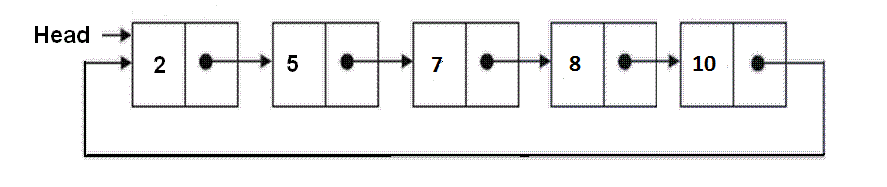


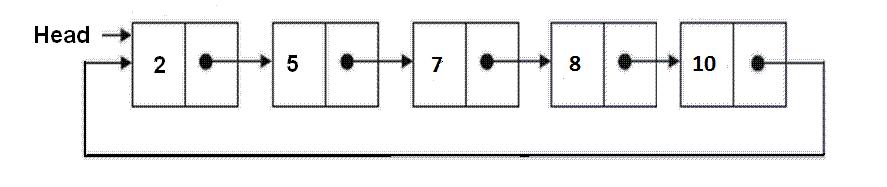




 RS-codes